#include <stdarg.h>
#include <stdbool.h>
#include <stddef.h>
#include <stdint.h>
#include <stdlib.h>
enum InitAction {
CreateWindow,
};
typedef uint8_t InitAction;
/**
* Code is the physical position of a key.
*
* The names are based on the US keyboard. If the key
* is not present on US keyboards, a name from another
* layout is used.
*
* Specification:
* <https://w3c.github.io/uievents-code/>
*/
enum KeyCode {
/**
* <kbd>`~</kbd> on a US keyboard. This is the <kbd>半角/全角/漢字</kbd> (<span class="unicode">hankaku/zenkaku/kanji</span>) key on Japanese keyboards
* This is also called a backtick or grave.
*/
Backquote,
/**
* Used for both the US <kbd>\|</kbd> (on the 101-key layout) and also for the key
* located between the <kbd>"</kbd> and <kbd>Enter</kbd> keys on row C of the 102-,
* 104- and 106-key layouts.
* Labelled <kbd>#~</kbd> on a UK (102) keyboard.
*/
Backslash,
/**
* <kbd>[{</kbd> on a US keyboard.
*/
BracketLeft,
/**
* <kbd>]}</kbd> on a US keyboard.
*/
BracketRight,
/**
* <kbd>,<</kbd> on a US keyboard.
*/
Comma,
/**
* <kbd>0)</kbd> on a US keyboard.
*/
Digit0,
/**
* <kbd>1!</kbd> on a US keyboard.
*/
Digit1,
/**
* <kbd>2@</kbd> on a US keyboard.
*/
Digit2,
/**
* <kbd>3#</kbd> on a US keyboard.
*/
Digit3,
/**
* <kbd>4$</kbd> on a US keyboard.
*/
Digit4,
/**
* <kbd>5%</kbd> on a US keyboard.
*/
Digit5,
/**
* <kbd>6^</kbd> on a US keyboard.
*/
Digit6,
/**
* <kbd>7&</kbd> on a US keyboard.
*/
Digit7,
/**
* <kbd>8*</kbd> on a US keyboard.
*/
Digit8,
/**
* <kbd>9(</kbd> on a US keyboard.
*/
Digit9,
/**
* <kbd>=+</kbd> on a US keyboard.
*/
Equal,
/**
* Located between the left <kbd>Shift</kbd> and <kbd>Z</kbd> keys.
* Labelled <kbd>\|</kbd> on a UK keyboard.
*/
IntlBackslash,
/**
* Located between the <kbd>/</kbd> and right <kbd>Shift</kbd> keys.
* Labelled <kbd>\ろ</kbd> (<span class="unicode">ro</span>) on a Japanese keyboard.
*/
IntlRo,
/**
* Located between the <kbd>=</kbd> and <kbd>Backspace</kbd> keys.
* Labelled <kbd>¥</kbd> (<span class="unicode">yen</span>) on a Japanese keyboard. <kbd>\/</kbd> on a
* Russian keyboard.
*/
IntlYen,
/**
* <kbd>a</kbd> on a US keyboard.
* Labelled <kbd>q</kbd> on an AZERTY (e.g., French) keyboard.
*/
KeyA,
/**
* <kbd>b</kbd> on a US keyboard.
*/
KeyB,
/**
* <kbd>c</kbd> on a US keyboard.
*/
KeyC,
/**
* <kbd>d</kbd> on a US keyboard.
*/
KeyD,
/**
* <kbd>e</kbd> on a US keyboard.
*/
KeyE,
/**
* <kbd>f</kbd> on a US keyboard.
*/
KeyF,
/**
* <kbd>g</kbd> on a US keyboard.
*/
KeyG,
/**
* <kbd>h</kbd> on a US keyboard.
*/
KeyH,
/**
* <kbd>i</kbd> on a US keyboard.
*/
KeyI,
/**
* <kbd>j</kbd> on a US keyboard.
*/
KeyJ,
/**
* <kbd>k</kbd> on a US keyboard.
*/
KeyK,
/**
* <kbd>l</kbd> on a US keyboard.
*/
KeyL,
/**
* <kbd>m</kbd> on a US keyboard.
*/
KeyM,
/**
* <kbd>n</kbd> on a US keyboard.
*/
KeyN,
/**
* <kbd>o</kbd> on a US keyboard.
*/
KeyO,
/**
* <kbd>p</kbd> on a US keyboard.
*/
KeyP,
/**
* <kbd>q</kbd> on a US keyboard.
* Labelled <kbd>a</kbd> on an AZERTY (e.g., French) keyboard.
*/
KeyQ,
/**
* <kbd>r</kbd> on a US keyboard.
*/
KeyR,
/**
* <kbd>s</kbd> on a US keyboard.
*/
KeyS,
/**
* <kbd>t</kbd> on a US keyboard.
*/
KeyT,
/**
* <kbd>u</kbd> on a US keyboard.
*/
KeyU,
/**
* <kbd>v</kbd> on a US keyboard.
*/
KeyV,
/**
* <kbd>w</kbd> on a US keyboard.
* Labelled <kbd>z</kbd> on an AZERTY (e.g., French) keyboard.
*/
KeyW,
/**
* <kbd>x</kbd> on a US keyboard.
*/
KeyX,
/**
* <kbd>y</kbd> on a US keyboard.
* Labelled <kbd>z</kbd> on a QWERTZ (e.g., German) keyboard.
*/
KeyY,
/**
* <kbd>z</kbd> on a US keyboard.
* Labelled <kbd>w</kbd> on an AZERTY (e.g., French) keyboard, and <kbd>y</kbd> on a
* QWERTZ (e.g., German) keyboard.
*/
KeyZ,
/**
* <kbd>-_</kbd> on a US keyboard.
*/
Minus,
/**
* <kbd>.></kbd> on a US keyboard.
*/
Period,
/**
* <kbd>'"</kbd> on a US keyboard.
* This is also called an apostrophe.
*/
Quote,
/**
* <kbd>;:</kbd> on a US keyboard.
*/
Semicolon,
/**
* <kbd>/?</kbd> on a US keyboard.
*/
Slash,
/**
* <kbd>Alt</kbd>, <kbd>Option</kbd> or <kbd>⌥</kbd>.
*/
AltLeft,
/**
* <kbd>Alt</kbd>, <kbd>Option</kbd> or <kbd>⌥</kbd>.
* This is labelled <kbd>AltGr</kbd> key on many keyboard layouts.
*/
AltRight,
/**
* <kbd>Backspace</kbd> or <kbd>⌫</kbd>.
* Labelled <kbd>Delete</kbd> on Apple keyboards.
*/
Backspace,
/**
* <kbd>CapsLock</kbd> or <kbd>⇪</kbd>
*/
CapsLock,
/**
* The application context menu key, which is typically found between the right <kbd>Meta</kbd> key and the right <kbd>Control</kbd> key.
*/
ContextMenu,
/**
* <kbd>Control</kbd> or <kbd>⌃</kbd>
*/
ControlLeft,
/**
* <kbd>Control</kbd> or <kbd>⌃</kbd>
*/
ControlRight,
/**
* <kbd>Enter</kbd> or <kbd>↵</kbd>. Labelled <kbd>Return</kbd> on Apple keyboards.
*/
Enter,
/**
* The Windows, <kbd>⌘</kbd>, <kbd>Command</kbd> or other OS symbol key.
* In Linux (XKB) terminology, this is often referred to as the left "Super".
*/
MetaLeft,
/**
* The Windows, <kbd>⌘</kbd>, <kbd>Command</kbd> or other OS symbol key.
* In Linux (XKB) terminology, this is often referred to as the right "Super".
*/
MetaRight,
/**
* <kbd>Shift</kbd> or <kbd>⇧</kbd>
*/
ShiftLeft,
/**
* <kbd>Shift</kbd> or <kbd>⇧</kbd>
*/
ShiftRight,
/**
* <kbd> </kbd> (space)
*/
Space,
/**
* <kbd>Tab</kbd> or <kbd>⇥</kbd>
*/
Tab,
/**
* Japanese: <kbd>変換</kbd> (<span class="unicode">henkan</span>)
*/
Convert,
/**
* Japanese: <kbd>カタカナ/ひらがな/ローマ字</kbd> (<span class="unicode">katakana/hiragana/romaji</span>)
*/
KanaMode,
/**
* Korean: HangulMode <kbd>한/영</kbd> (<span class="unicode">han/yeong</span>)<br/>Japanese (Mac keyboard): <kbd>かな</kbd> (<span class="unicode">kana</span>)
*/
Lang1,
/**
* Korean: Hanja <kbd>한자</kbd> (<span class="unicode">hanja</span>)<br/>Japanese (Mac keyboard): <kbd>英数</kbd> (<span class="unicode">eisu</span>)
*/
Lang2,
/**
* Japanese (word-processing keyboard): Katakana
*/
Lang3,
/**
* Japanese (word-processing keyboard): Hiragana
*/
Lang4,
/**
* Japanese (word-processing keyboard): Zenkaku/Hankaku
*/
Lang5,
/**
* Japanese: <kbd>無変換</kbd> (<span class="unicode">muhenkan</span>)
*/
NonConvert,
/**
* <kbd>⌦</kbd>. The forward delete key.
* Note that on Apple keyboards, the key labelled <kbd>Delete</kbd> on the main part of
* the keyboard should be encoded as [`Backspace`][Code::Backspace].
*/
Delete,
/**
* <kbd>End</kbd> or <kbd>↘</kbd>
*/
End,
/**
* <kbd>Help</kbd>. Not present on standard PC keyboards.
*/
Help,
/**
* <kbd>Home</kbd> or <kbd>↖</kbd>
*/
Home,
/**
* <kbd>Insert</kbd> or <kbd>Ins</kbd>. Not present on Apple keyboards.
*/
Insert,
/**
* <kbd>Page Down</kbd>, <kbd>PgDn</kbd> or <kbd>⇟</kbd>
*/
PageDown,
/**
* <kbd>Page Up</kbd>, <kbd>PgUp</kbd> or <kbd>⇞</kbd>
*/
PageUp,
/**
* <kbd>↓</kbd>
*/
ArrowDown,
/**
* <kbd>←</kbd>
*/
ArrowLeft,
/**
* <kbd>→</kbd>
*/
ArrowRight,
/**
* <kbd>↑</kbd>
*/
ArrowUp,
/**
* On the Mac, the [`NumLock`][Code::NumLock] code should be used for the numpad <kbd>Clear</kbd> key.
*/
NumLock,
/**
* <kbd>0 Ins</kbd> on a keyboard<br/><kbd>0</kbd> on a phone or remote control
*/
Numpad0,
/**
* <kbd>1 End</kbd> on a keyboard<br/><kbd>1</kbd> or <kbd>1 QZ</kbd> on a phone or
* remote control
*/
Numpad1,
/**
* <kbd>2 ↓</kbd> on a keyboard<br/><kbd>2 ABC</kbd> on a phone or remote control
*/
Numpad2,
/**
* <kbd>3 PgDn</kbd> on a keyboard<br/><kbd>3 DEF</kbd> on a phone or remote control
*/
Numpad3,
/**
* <kbd>4 ←</kbd> on a keyboard<br/><kbd>4 GHI</kbd> on a phone or remote control
*/
Numpad4,
/**
* <kbd>5</kbd> on a keyboard<br/><kbd>5 JKL</kbd> on a phone or remote control
*/
Numpad5,
/**
* <kbd>6 →</kbd> on a keyboard<br/><kbd>6 MNO</kbd> on a phone or remote control
*/
Numpad6,
/**
* <kbd>7 Home</kbd> on a keyboard<br/><kbd>7 PQRS</kbd> or <kbd>7 PRS</kbd> on a phone
* or remote control
*/
Numpad7,
/**
* <kbd>8 ↑</kbd> on a keyboard<br/><kbd>8 TUV</kbd> on a phone or remote control
*/
Numpad8,
/**
* <kbd>9 PgUp</kbd> on a keyboard<br/><kbd>9 WXYZ</kbd> or <kbd>9 WXY</kbd> on a phone
* or remote control
*/
Numpad9,
/**
* <kbd>+</kbd>
*/
NumpadAdd,
/**
* Found on the Microsoft Natural Keyboard.
*/
NumpadBackspace,
/**
* <kbd>C</kbd> or <kbd>AC</kbd> (All Clear). Also for use with numpads that have a <kbd>Clear</kbd> key that is separate from the <kbd>NumLock</kbd> key. On the Mac, the numpad <kbd>Clear</kbd> key should always
* be encoded as [`NumLock`][Code::NumLock].
*/
NumpadClear,
/**
* <kbd>CE</kbd> (Clear Entry)
*/
NumpadClearEntry,
/**
* <kbd>,</kbd> (thousands separator). For locales where the thousands separator
* is a "." (e.g., Brazil), this key may generate a <kbd>.</kbd>.
*/
NumpadComma,
/**
* <kbd>. Del</kbd>. For locales where the decimal separator is "," (e.g.,
* Brazil), this key may generate a <kbd>,</kbd>.
*/
NumpadDecimal,
/**
* <kbd>/</kbd>
*/
NumpadDivide,
NumpadEnter,
/**
* <kbd>=</kbd>
*/
NumpadEqual,
/**
* <kbd>#</kbd> on a phone or remote control device. This key is typically found
* below the <kbd>9</kbd> key and to the right of the <kbd>0</kbd> key.
*/
NumpadHash,
/**
* <kbd>M+</kbd> Add current entry to the value stored in memory.
*/
NumpadMemoryAdd,
/**
* <kbd>MC</kbd> Clear the value stored in memory.
*/
NumpadMemoryClear,
/**
* <kbd>MR</kbd> Replace the current entry with the value stored in memory.
*/
NumpadMemoryRecall,
/**
* <kbd>MS</kbd> Replace the value stored in memory with the current entry.
*/
NumpadMemoryStore,
/**
* <kbd>M-</kbd> Subtract current entry from the value stored in memory.
*/
NumpadMemorySubtract,
/**
* <kbd>*</kbd> on a keyboard. For use with numpads that provide mathematical
* operations (<kbd>+</kbd>, <kbd>-</kbd>, <kbd>*</kbd> and <kbd>/</kbd>).<br/>Use [`NumpadStar`][Code::NumpadStar] for the <kbd>*</kbd> key on phones and remote controls.
*/
NumpadMultiply,
/**
* <kbd>(</kbd> Found on the Microsoft Natural Keyboard.
*/
NumpadParenLeft,
/**
* <kbd>)</kbd> Found on the Microsoft Natural Keyboard.
*/
NumpadParenRight,
/**
* <kbd>*</kbd> on a phone or remote control device.
* This key is typically found below the <kbd>7</kbd> key and to the left of
* the <kbd>0</kbd> key.<br/>Use [`NumpadMultiply`][Code::NumpadMultiply] for the <kbd>*</kbd> key on
* numeric keypads.
*/
NumpadStar,
/**
* <kbd>-</kbd>
*/
NumpadSubtract,
/**
* <kbd>Esc</kbd> or <kbd>⎋</kbd>
*/
Escape,
/**
* <kbd>Fn</kbd> This is typically a hardware key that does not generate a separate
* code. Most keyboards do not place this key in the function section, but it is
* included here to keep it with related keys.
*/
Fn,
/**
* <kbd>FLock</kbd> or <kbd>FnLock</kbd>. Function Lock key. Found on the Microsoft
* Natural Keyboard.
*/
FnLock,
/**
* <kbd>PrtScr SysRq</kbd> or <kbd>Print Screen</kbd>
*/
PrintScreen,
/**
* <kbd>Scroll Lock</kbd>
*/
ScrollLock,
/**
* <kbd>Pause Break</kbd>
*/
Pause,
/**
* Some laptops place this key to the left of the <kbd>↑</kbd> key.
*/
BrowserBack,
BrowserFavorites,
/**
* Some laptops place this key to the right of the <kbd>↑</kbd> key.
*/
BrowserForward,
BrowserHome,
BrowserRefresh,
BrowserSearch,
BrowserStop,
/**
* <kbd>Eject</kbd> or <kbd>⏏</kbd>. This key is placed in the function
* section on some Apple keyboards.
*/
Eject,
/**
* Sometimes labelled <kbd>My Computer</kbd> on the keyboard
*/
LaunchApp1,
/**
* Sometimes labelled <kbd>Calculator</kbd> on the keyboard
*/
LaunchApp2,
LaunchMail,
MediaPlayPause,
MediaSelect,
MediaStop,
MediaTrackNext,
MediaTrackPrevious,
/**
* This key is placed in the function section on some Apple keyboards,
* replacing the <kbd>Eject</kbd> key.
*/
Power,
Sleep,
AudioVolumeDown,
AudioVolumeMute,
AudioVolumeUp,
WakeUp,
Hyper,
Super,
Turbo,
Abort,
Resume,
Suspend,
/**
* Found on Sun’s USB keyboard.
*/
Again,
/**
* Found on Sun’s USB keyboard.
*/
Copy,
/**
* Found on Sun’s USB keyboard.
*/
Cut,
/**
* Found on Sun’s USB keyboard.
*/
Find,
/**
* Found on Sun’s USB keyboard.
*/
Open,
/**
* Found on Sun’s USB keyboard.
*/
Paste,
/**
* Found on Sun’s USB keyboard.
*/
Props,
/**
* Found on Sun’s USB keyboard.
*/
Select,
/**
* Found on Sun’s USB keyboard.
*/
Undo,
/**
* Use for dedicated <kbd>ひらがな</kbd> key found on some Japanese word processing keyboards.
*/
Hiragana,
/**
* Use for dedicated <kbd>カタカナ</kbd> key found on some Japanese word processing keyboards.
*/
Katakana,
/**
* This value code should be used when no other
* value given in this specification is appropriate.
*/
Unidentified,
/**
* <kbd>F1</kbd>
*/
F1,
/**
* <kbd>F2</kbd>
*/
F2,
/**
* <kbd>F3</kbd>
*/
F3,
/**
* <kbd>F4</kbd>
*/
F4,
/**
* <kbd>F5</kbd>
*/
F5,
/**
* <kbd>F6</kbd>
*/
F6,
/**
* <kbd>F7</kbd>
*/
F7,
/**
* <kbd>F8</kbd>
*/
F8,
/**
* <kbd>F9</kbd>
*/
F9,
/**
* <kbd>F10</kbd>
*/
F10,
/**
* <kbd>F11</kbd>
*/
F11,
/**
* <kbd>F12</kbd>
*/
F12,
/**
* <kbd>F13</kbd>
*/
F13,
/**
* <kbd>F14</kbd>
*/
F14,
/**
* <kbd>F15</kbd>
*/
F15,
/**
* <kbd>F16</kbd>
*/
F16,
/**
* <kbd>F17</kbd>
*/
F17,
/**
* <kbd>F18</kbd>
*/
F18,
/**
* <kbd>F19</kbd>
*/
F19,
/**
* <kbd>F20</kbd>
*/
F20,
/**
* <kbd>F21</kbd>
*/
F21,
/**
* <kbd>F22</kbd>
*/
F22,
/**
* <kbd>F23</kbd>
*/
F23,
/**
* <kbd>F24</kbd>
*/
F24,
/**
* <kbd>F25</kbd>
*/
F25,
/**
* <kbd>F26</kbd>
*/
F26,
/**
* <kbd>F27</kbd>
*/
F27,
/**
* <kbd>F28</kbd>
*/
F28,
/**
* <kbd>F29</kbd>
*/
F29,
/**
* <kbd>F30</kbd>
*/
F30,
/**
* <kbd>F31</kbd>
*/
F31,
/**
* <kbd>F32</kbd>
*/
F32,
/**
* <kbd>F33</kbd>
*/
F33,
/**
* <kbd>F34</kbd>
*/
F34,
/**
* <kbd>F35</kbd>
*/
F35,
/**
* Non-standard code value supported by Chromium.
*/
BrightnessDown,
/**
* Non-standard code value supported by Chromium.
*/
BrightnessUp,
/**
* Non-standard code value supported by Chromium.
*/
DisplayToggleIntExt,
/**
* Non-standard code value supported by Chromium.
*/
KeyboardLayoutSelect,
/**
* Non-standard code value supported by Chromium.
*/
LaunchAssistant,
/**
* Non-standard code value supported by Chromium.
*/
LaunchControlPanel,
/**
* Non-standard code value supported by Chromium.
*/
LaunchScreenSaver,
/**
* Non-standard code value supported by Chromium.
*/
MailForward,
/**
* Non-standard code value supported by Chromium.
*/
MailReply,
/**
* Non-standard code value supported by Chromium.
*/
MailSend,
/**
* Non-standard code value supported by Chromium.
*/
MediaFastForward,
/**
* Non-standard code value supported by Chromium.
*/
MediaPause,
/**
* Non-standard code value supported by Chromium.
*/
MediaPlay,
/**
* Non-standard code value supported by Chromium.
*/
MediaRecord,
/**
* Non-standard code value supported by Chromium.
*/
MediaRewind,
/**
* Non-standard code value supported by Chromium.
*/
MicrophoneMuteToggle,
/**
* Non-standard code value supported by Chromium.
*/
PrivacyScreenToggle,
/**
* Non-standard code value supported by Chromium.
*/
KeyboardBacklightToggle,
/**
* Non-standard code value supported by Chromium.
*/
SelectTask,
/**
* Non-standard code value supported by Chromium.
*/
ShowAllWindows,
/**
* Non-standard code value supported by Chromium.
*/
ZoomToggle,
};
typedef uint8_t KeyCode;
/**
* Key represents the meaning of a keypress.
*
* Specification:
* <https://w3c.github.io/uievents-key/>
*
* Note: "Space" is deliberately not a named key (to match the specification), use
* `Key::Character(" ")` instead.
*/
enum NamedKey {
/**
* This key value is used when an implementation is unable to
* identify another key value, due to either hardware,
* platform, or software constraints.
*/
Unidentified,
/**
* The <kbd>Alt</kbd> (Alternative) key.<br/> This key enables the alternate modifier function for interpreting concurrent or subsequent keyboard input.<br/> This key value is also used for the Apple <kbd>Option</kbd> key.
*/
Alt,
/**
* The Alternate Graphics (<kbd>AltGr</kbd> or <kbd>AltGraph</kbd>) key.
* This key is used enable the ISO Level 3 shift modifier (the standard <kbd>Shift</kbd> key is the level 2 modifier).
* See [ISO9995-1].
*/
AltGraph,
/**
* The <kbd>Caps Lock</kbd> (Capital) key.
* Toggle capital character lock function for interpreting subsequent keyboard input event.
*/
CapsLock,
/**
* The <kbd>Control</kbd> or <kbd>Ctrl</kbd> key, to enable control modifier function for interpreting concurrent or subsequent keyboard input.
*/
Control,
/**
* The Function switch <kbd>Fn</kbd> key.<br/> Activating this key simultaneously with another key changes that key’s value to an alternate character or function.
* This key is often handled directly in the keyboard hardware and does not usually generate key events.
*/
Fn,
/**
* The Function-Lock (<kbd>FnLock</kbd> or <kbd>F-Lock</kbd>) key.
* Activating this key switches the mode of the keyboard to changes some keys' values to an alternate character or function.
* This key is often handled directly in the keyboard hardware and does not usually generate key events.
*/
FnLock,
/**
* The <kbd>Meta</kbd> key, to enable meta modifier function for interpreting concurrent or subsequent keyboard input.
* This key value is used for the <q>Windows Logo</q> key and the Apple <kbd>Command</kbd> or <kbd>⌘</kbd> key.
* In Linux (XKB) terminology, this is often referred to as "Super".
*/
Meta,
/**
* The <kbd>NumLock</kbd> or Number Lock key, to toggle numpad mode function for interpreting subsequent keyboard input.
*/
NumLock,
/**
* The <kbd>Scroll Lock</kbd> key, to toggle between scrolling and cursor movement modes.
*/
ScrollLock,
/**
* The <kbd>Shift</kbd> key, to enable shift modifier function for interpreting concurrent or subsequent keyboard input.
*/
Shift,
/**
* The Symbol modifier key (used on some virtual keyboards).
*/
Symbol,
/**
* The Symbol Lock key.
*/
SymbolLock,
/**
* The <kbd>Hyper</kbd> key.
*/
Hyper,
/**
* The <kbd>Super</kbd> key.
*/
Super,
/**
* The <kbd>Enter</kbd> or <kbd>↵</kbd> key, to activate current selection or accept current input.<br/> This key value is also used for the <kbd>Return</kbd> (Macintosh numpad) key.<br/> This key value is also used for the Android <code class="android">KEYCODE_DPAD_CENTER</code>.
*/
Enter,
/**
* The Horizontal Tabulation <kbd>Tab</kbd> key.
*/
Tab,
/**
* The down arrow key, to navigate or traverse downward. (<code class="android">KEYCODE_DPAD_DOWN</code>)
*/
ArrowDown,
/**
* The left arrow key, to navigate or traverse leftward. (<code class="android">KEYCODE_DPAD_LEFT</code>)
*/
ArrowLeft,
/**
* The right arrow key, to navigate or traverse rightward. (<code class="android">KEYCODE_DPAD_RIGHT</code>)
*/
ArrowRight,
/**
* The up arrow key, to navigate or traverse upward. (<code class="android">KEYCODE_DPAD_UP</code>)
*/
ArrowUp,
/**
* The End key, used with keyboard entry to go to the end of content (<code class="android">KEYCODE_MOVE_END</code>).
*/
End,
/**
* The Home key, used with keyboard entry, to go to start of content (<code class="android">KEYCODE_MOVE_HOME</code>).<br/> For the mobile phone <kbd>Home</kbd> key (which goes to the phone’s main screen), use [`GoHome`][NamedKey::GoHome].
*/
Home,
/**
* The Page Down key, to scroll down or display next page of content.
*/
PageDown,
/**
* The Page Up key, to scroll up or display previous page of content.
*/
PageUp,
/**
* The Backspace key. This key value is also used for the key labeled <kbd>Delete</kbd> on MacOS keyboards.
*/
Backspace,
/**
* Remove the currently selected input.
*/
Clear,
/**
* Copy the current selection. (<code class="appcommand">APPCOMMAND_COPY</code>)
*/
Copy,
/**
* The Cursor Select (Crsel) key.
*/
CrSel,
/**
* Cut the current selection. (<code class="appcommand">APPCOMMAND_CUT</code>)
*/
Cut,
/**
* The Delete (Del) Key.
* This key value is also used for the key labeled <kbd>Delete</kbd> on MacOS keyboards when modified by the <kbd>Fn</kbd> key.
*/
Delete,
/**
* The Erase to End of Field key.
* This key deletes all characters from the current cursor position to the end of the current field.
*/
EraseEof,
/**
* The Extend Selection (Exsel) key.
*/
ExSel,
/**
* The Insert (Ins) key, to toggle between text modes for insertion or overtyping. (<code class="android">KEYCODE_INSERT</code>)
*/
Insert,
/**
* The Paste key. (<code class="appcommand">APPCOMMAND_PASTE</code>)
*/
Paste,
/**
* Redo the last action. (<code class="appcommand">APPCOMMAND_REDO</code>)
*/
Redo,
/**
* Undo the last action. (<code class="appcommand">APPCOMMAND_UNDO</code>)
*/
Undo,
/**
* The Accept (Commit, OK) key. Accept current option or input method sequence conversion.
*/
Accept,
/**
* The Again key, to redo or repeat an action.
*/
Again,
/**
* The Attention (Attn) key.
*/
Attn,
/**
* The Cancel key.
*/
Cancel,
/**
* Show the application’s context menu.
* This key is commonly found between the right <kbd>Meta</kbd> key and the right <kbd>Control</kbd> key.
*/
ContextMenu,
/**
* The <kbd>Esc</kbd> key. This key was originally used to initiate an escape sequence, but is
* now more generally used to exit or "escape" the current context, such as closing a dialog
* or exiting full screen mode.
*/
Escape,
/**
* The Execute key.
*/
Execute,
/**
* Open the Find dialog. (<code class="appcommand">APPCOMMAND_FIND</code>)
*/
Find,
/**
* Open a help dialog or toggle display of help information. (<code class="appcommand"><code class="appcommand">APPCOMMAND_HELP</code></code>, <code class="android"><code class="android">KEYCODE_HELP</code></code>)
*/
Help,
/**
* Pause the current state or application (as appropriate).
* <p class="note" role="note">Do not use this value for the <kbd>Pause</kbd> button on media controllers. Use [`MediaPause`][NamedKey::MediaPause] instead.</p>
*/
Pause,
/**
* Play or resume the current state or application (as appropriate).
* <p class="note" role="note">Do not use this value for the <kbd>Play</kbd> button on media controllers. Use [`MediaPlay`][NamedKey::MediaPlay] instead.</p>
*/
Play,
/**
* The properties (Props) key.
*/
Props,
/**
* The Select key.
*/
Select,
/**
* The ZoomIn key. (<code class="android">KEYCODE_ZOOM_IN</code>)
*/
ZoomIn,
/**
* The ZoomOut key. (<code class="android">KEYCODE_ZOOM_OUT</code>)
*/
ZoomOut,
/**
* The Brightness Down key. Typically controls the display brightness. (<code class="android">KEYCODE_BRIGHTNESS_DOWN</code>)
*/
BrightnessDown,
/**
* The Brightness Up key. Typically controls the display brightness. (<code class="android">KEYCODE_BRIGHTNESS_UP</code>)
*/
BrightnessUp,
/**
* Toggle removable media to eject (open) and insert (close) state. (<code class="android">KEYCODE_MEDIA_EJECT</code>)
*/
Eject,
/**
* The LogOff key.
*/
LogOff,
/**
* Toggle power state. (<code class="android">KEYCODE_POWER</code>)
* <p class="note" role="note">Note: Some devices might not expose this key to the operating environment.</p>
*/
Power,
/**
* The <kbd>PowerOff</kbd> key. Sometime called <kbd>PowerDown</kbd>.
*/
PowerOff,
/**
* The <kbd>Print Screen</kbd> or <kbd>SnapShot</kbd> key, to initiate print-screen function.
*/
PrintScreen,
/**
* The Hibernate key.
* This key saves the current state of the computer to disk so that it can be restored. The computer will then shutdown.
*/
Hibernate,
/**
* The Standby key.
* This key turns off the display and places the computer into a low-power mode without completely shutting down.
* It is sometimes labelled <kbd>Suspend</kbd> or <kbd>Sleep</kbd> key. (<code class="android"><code class="android">KEYCODE_SLEEP</code></code>)
*/
Standby,
/**
* The WakeUp key. (<code class="android">KEYCODE_WAKEUP</code>)
*/
WakeUp,
/**
* The All Candidates key, to initiate the multi-candidate mode.
*/
AllCandidates,
/**
* The Alphanumeric key.
*/
Alphanumeric,
/**
* The Code Input key, to initiate the Code Input mode to allow characters to be entered by their code points.
*/
CodeInput,
/**
* The Compose key, also known as <em>Multi_key</em> on the X Window System.
* This key acts in a manner similar to a
* dead key, triggering a mode where subsequent key presses are combined to produce a different character.
*/
Compose,
/**
* The Convert key, to convert the current input method sequence.
*/
Convert,
/**
* A dead key combining key. It may be any combining key from any keyboard layout. For example, on a
* PC/AT French keyboard, using a French mapping and without any modifier activated, this is the key value <code class="unicode">U+0302</code> COMBINING CIRCUMFLEX ACCENT. In another layout this might be a different unicode combining key.<br/> For applications that need to differentiate between specific combining characters, the associated compositionupdate event’s data attribute provides the specific key value.
*/
Dead,
/**
* The Final Mode <kbd>Final</kbd> key used on some Asian keyboards, to enable the final mode for IMEs.
*/
FinalMode,
/**
* Switch to the first character group. (ISO/IEC 9995)
*/
GroupFirst,
/**
* Switch to the last character group. (ISO/IEC 9995)
*/
GroupLast,
/**
* Switch to the next character group. (ISO/IEC 9995)
*/
GroupNext,
/**
* Switch to the previous character group. (ISO/IEC 9995)
*/
GroupPrevious,
/**
* The Mode Change key, to toggle between or cycle through input modes of IMEs.
*/
ModeChange,
/**
* The Next Candidate function key.
*/
NextCandidate,
/**
* The NonConvert ("Don’t Convert") key, to accept current input method sequence without conversion in IMEs.
*/
NonConvert,
/**
* The Previous Candidate function key.
*/
PreviousCandidate,
/**
* The Process key.
*/
Process,
/**
* The Single Candidate function key.
*/
SingleCandidate,
/**
* The Hangul (Korean characters) Mode key, to toggle between Hangul and English modes.
*/
HangulMode,
/**
* The Hanja (Korean characters) Mode key.
*/
HanjaMode,
/**
* The Junja (Korean characters) Mode key.
*/
JunjaMode,
/**
* The Eisu key. This key may close the IME, but its purpose
* is defined by the current IME. (<code class="android">KEYCODE_EISU</code>)
*/
Eisu,
/**
* The (Half-Width) Characters key.
*/
Hankaku,
/**
* The Hiragana (Japanese Kana characters) key.
*/
Hiragana,
/**
* The Hiragana/Katakana toggle key. (<code class="android">KEYCODE_KATAKANA_HIRAGANA</code>)
*/
HiraganaKatakana,
/**
* The Kana Mode (Kana Lock) key. This key is used to enter
* hiragana mode (typically from romaji mode).
*/
KanaMode,
/**
* The Kanji (Japanese name for ideographic characters of Chinese origin) Mode key.
* This key is typically used to switch to a hiragana keyboard for
* the purpose of converting input into kanji. (<code class="android">KEYCODE_KANA</code>)
*/
KanjiMode,
/**
* The Katakana (Japanese Kana characters) key.
*/
Katakana,
/**
* The Roman characters function key.
*/
Romaji,
/**
* The Zenkaku (Full-Width) Characters key.
*/
Zenkaku,
/**
* The Zenkaku/Hankaku (full-width/half-width) toggle key. (<code class="android">KEYCODE_ZENKAKU_HANKAKU</code>)
*/
ZenkakuHankaku,
/**
* General purpose virtual function key, as index 1.
*/
Soft1,
/**
* General purpose virtual function key, as index 2.
*/
Soft2,
/**
* General purpose virtual function key, as index 3.
*/
Soft3,
/**
* General purpose virtual function key, as index 4.
*/
Soft4,
/**
* Select next (numerically or logically) lower channel. (<code class="appcommand"><code class="appcommand">APPCOMMAND_MEDIA_CHANNEL_DOWN</code></code>, <code class="android"><code class="android">KEYCODE_CHANNEL_DOWN</code></code>)
*/
ChannelDown,
/**
* Select next (numerically or logically) higher channel. (<code class="appcommand"><code class="appcommand">APPCOMMAND_MEDIA_CHANNEL_UP</code></code>, <code class="android"><code class="android">KEYCODE_CHANNEL_UP</code></code>)
*/
ChannelUp,
/**
* Close the current document or message (Note: This doesn’t close the application). (<code class="appcommand">APPCOMMAND_CLOSE</code>)
*/
Close,
/**
* Open an editor to forward the current message. (<code class="appcommand">APPCOMMAND_FORWARD_MAIL</code>)
*/
MailForward,
/**
* Open an editor to reply to the current message. (<code class="appcommand">APPCOMMAND_REPLY_TO_MAIL</code>)
*/
MailReply,
/**
* Send the current message. (<code class="appcommand">APPCOMMAND_SEND_MAIL</code>)
*/
MailSend,
/**
* Close the current media, for example to close a CD or DVD tray. (<code class="android">KEYCODE_MEDIA_CLOSE</code>)
*/
MediaClose,
/**
* Initiate or continue forward playback at faster than normal speed, or increase speed if already fast forwarding. (<code class="appcommand"><code class="appcommand">APPCOMMAND_MEDIA_FAST_FORWARD</code></code>, <code class="android"><code class="android">KEYCODE_MEDIA_FAST_FORWARD</code></code>)
*/
MediaFastForward,
/**
* Pause the currently playing media. (<code class="appcommand"><code class="appcommand">APPCOMMAND_MEDIA_PAUSE</code></code>, <code class="android"><code class="android">KEYCODE_MEDIA_PAUSE</code></code>)
* <p class="note" role="note">Media controller devices should use this value rather than [`Pause`][NamedKey::Pause] for their pause keys.</p>
*/
MediaPause,
/**
* Initiate or continue media playback at normal speed, if not currently playing at normal speed. (<code class="appcommand"><code class="appcommand">APPCOMMAND_MEDIA_PLAY</code></code>, <code class="android"><code class="android">KEYCODE_MEDIA_PLAY</code></code>)
*/
MediaPlay,
/**
* Toggle media between play and pause states. (<code class="appcommand"><code class="appcommand">APPCOMMAND_MEDIA_PLAY_PAUSE</code></code>, <code class="android"><code class="android">KEYCODE_MEDIA_PLAY_PAUSE</code></code>)
*/
MediaPlayPause,
/**
* Initiate or resume recording of currently selected media. (<code class="appcommand"><code class="appcommand">APPCOMMAND_MEDIA_RECORD</code></code>, <code class="android"><code class="android">KEYCODE_MEDIA_RECORD</code></code>)
*/
MediaRecord,
/**
* Initiate or continue reverse playback at faster than normal speed, or increase speed if already rewinding. (<code class="appcommand"><code class="appcommand">APPCOMMAND_MEDIA_REWIND</code></code>, <code class="android"><code class="android">KEYCODE_MEDIA_REWIND</code></code>)
*/
MediaRewind,
/**
* Stop media playing, pausing, forwarding, rewinding, or recording, if not already stopped. (<code class="appcommand"><code class="appcommand">APPCOMMAND_MEDIA_STOP</code></code>, <code class="android"><code class="android">KEYCODE_MEDIA_STOP</code></code>)
*/
MediaStop,
/**
* Seek to next media or program track. (<code class="appcommand"><code class="appcommand">APPCOMMAND_MEDIA_NEXTTRACK</code></code>, <code class="android"><code class="android">KEYCODE_MEDIA_NEXT</code></code>)
*/
MediaTrackNext,
/**
* Seek to previous media or program track. (<code class="appcommand"><code class="appcommand">APPCOMMAND_MEDIA_PREVIOUSTRACK</code></code>, <code class="android"><code class="android">KEYCODE_MEDIA_PREVIOUS</code></code>)
*/
MediaTrackPrevious,
/**
* Open a new document or message. (<code class="appcommand">APPCOMMAND_NEW</code>)
*/
New,
/**
* Open an existing document or message. (<code class="appcommand">APPCOMMAND_OPEN</code>)
*/
Open,
/**
* Print the current document or message. (<code class="appcommand">APPCOMMAND_PRINT</code>)
*/
Print,
/**
* Save the current document or message. (<code class="appcommand">APPCOMMAND_SAVE</code>)
*/
Save,
/**
* Spellcheck the current document or selection. (<code class="appcommand">APPCOMMAND_SPELL_CHECK</code>)
*/
SpellCheck,
/**
* The <kbd>11</kbd> key found on media numpads that
* have buttons from <kbd>1</kbd> ... <kbd>12</kbd>.
*/
Key11,
/**
* The <kbd>12</kbd> key found on media numpads that
* have buttons from <kbd>1</kbd> ... <kbd>12</kbd>.
*/
Key12,
/**
* Adjust audio balance leftward. (<code class="vk">VK_AUDIO_BALANCE_LEFT</code>)
*/
AudioBalanceLeft,
/**
* Adjust audio balance rightward. (<code class="vk">VK_AUDIO_BALANCE_RIGHT</code>)
*/
AudioBalanceRight,
/**
* Decrease audio bass boost or cycle down through bass boost states. (<code class="appcommand"><code class="appcommand">APPCOMMAND_BASS_DOWN</code></code>, <code class="vk"><code class="vk">VK_BASS_BOOST_DOWN</code></code>)
*/
AudioBassBoostDown,
/**
* Toggle bass boost on/off. (<code class="appcommand">APPCOMMAND_BASS_BOOST</code>)
*/
AudioBassBoostToggle,
/**
* Increase audio bass boost or cycle up through bass boost states. (<code class="appcommand"><code class="appcommand">APPCOMMAND_BASS_UP</code></code>, <code class="vk"><code class="vk">VK_BASS_BOOST_UP</code></code>)
*/
AudioBassBoostUp,
/**
* Adjust audio fader towards front. (<code class="vk">VK_FADER_FRONT</code>)
*/
AudioFaderFront,
/**
* Adjust audio fader towards rear. (<code class="vk">VK_FADER_REAR</code>)
*/
AudioFaderRear,
/**
* Advance surround audio mode to next available mode. (<code class="vk">VK_SURROUND_MODE_NEXT</code>)
*/
AudioSurroundModeNext,
/**
* Decrease treble. (<code class="appcommand">APPCOMMAND_TREBLE_DOWN</code>)
*/
AudioTrebleDown,
/**
* Increase treble. (<code class="appcommand">APPCOMMAND_TREBLE_UP</code>)
*/
AudioTrebleUp,
/**
* Decrease audio volume. (<code class="appcommand"><code class="appcommand">APPCOMMAND_VOLUME_DOWN</code></code>, <code class="android"><code class="android">KEYCODE_VOLUME_DOWN</code></code>)
*/
AudioVolumeDown,
/**
* Increase audio volume. (<code class="appcommand"><code class="appcommand">APPCOMMAND_VOLUME_UP</code></code>, <code class="android"><code class="android">KEYCODE_VOLUME_UP</code></code>)
*/
AudioVolumeUp,
/**
* Toggle between muted state and prior volume level. (<code class="appcommand"><code class="appcommand">APPCOMMAND_VOLUME_MUTE</code></code>, <code class="android"><code class="android">KEYCODE_VOLUME_MUTE</code></code>)
*/
AudioVolumeMute,
/**
* Toggle the microphone on/off. (<code class="appcommand">APPCOMMAND_MIC_ON_OFF_TOGGLE</code>)
*/
MicrophoneToggle,
/**
* Decrease microphone volume. (<code class="appcommand">APPCOMMAND_MICROPHONE_VOLUME_DOWN</code>)
*/
MicrophoneVolumeDown,
/**
* Increase microphone volume. (<code class="appcommand">APPCOMMAND_MICROPHONE_VOLUME_UP</code>)
*/
MicrophoneVolumeUp,
/**
* Mute the microphone. (<code class="appcommand"><code class="appcommand">APPCOMMAND_MICROPHONE_VOLUME_MUTE</code></code>, <code class="android"><code class="android">KEYCODE_MUTE</code></code>)
*/
MicrophoneVolumeMute,
/**
* Show correction list when a word is incorrectly identified. (<code class="appcommand">APPCOMMAND_CORRECTION_LIST</code>)
*/
SpeechCorrectionList,
/**
* Toggle between dictation mode and command/control mode. (<code class="appcommand">APPCOMMAND_DICTATE_OR_COMMAND_CONTROL_TOGGLE</code>)
*/
SpeechInputToggle,
/**
* The first generic "LaunchApplication" key. This is commonly associated with launching "My Computer", and may have a computer symbol on the key. (<code class="appcommand">APPCOMMAND_LAUNCH_APP1</code>)
*/
LaunchApplication1,
/**
* The second generic "LaunchApplication" key. This is commonly associated with launching "Calculator", and may have a calculator symbol on the key. (<code class="appcommand"><code class="appcommand">APPCOMMAND_LAUNCH_APP2</code></code>, <code class="android"><code class="android">KEYCODE_CALCULATOR</code></code>)
*/
LaunchApplication2,
/**
* The "Calendar" key. (<code class="android">KEYCODE_CALENDAR</code>)
*/
LaunchCalendar,
/**
* The "Contacts" key. (<code class="android">KEYCODE_CONTACTS</code>)
*/
LaunchContacts,
/**
* The "Mail" key. (<code class="appcommand">APPCOMMAND_LAUNCH_MAIL</code>)
*/
LaunchMail,
/**
* The "Media Player" key. (<code class="appcommand">APPCOMMAND_LAUNCH_MEDIA_SELECT</code>)
*/
LaunchMediaPlayer,
/**
* The "Music Player" key.
*/
LaunchMusicPlayer,
/**
* The "Phone" key.
*/
LaunchPhone,
/**
* The "Screen Saver" key.
*/
LaunchScreenSaver,
/**
* The "Spreadsheet" key.
*/
LaunchSpreadsheet,
/**
* The "Web Browser" key.
*/
LaunchWebBrowser,
/**
* The "WebCam" key.
*/
LaunchWebCam,
/**
* The "Word Processor" key.
*/
LaunchWordProcessor,
/**
* Navigate to previous content or page in current history. (<code class="appcommand">APPCOMMAND_BROWSER_BACKWARD</code>)
*/
BrowserBack,
/**
* Open the list of browser favorites. (<code class="appcommand">APPCOMMAND_BROWSER_FAVORITES</code>)
*/
BrowserFavorites,
/**
* Navigate to next content or page in current history. (<code class="appcommand">APPCOMMAND_BROWSER_FORWARD</code>)
*/
BrowserForward,
/**
* Go to the user’s preferred home page. (<code class="appcommand">APPCOMMAND_BROWSER_HOME</code>)
*/
BrowserHome,
/**
* Refresh the current page or content. (<code class="appcommand">APPCOMMAND_BROWSER_REFRESH</code>)
*/
BrowserRefresh,
/**
* Call up the user’s preferred search page. (<code class="appcommand">APPCOMMAND_BROWSER_SEARCH</code>)
*/
BrowserSearch,
/**
* Stop loading the current page or content. (<code class="appcommand">APPCOMMAND_BROWSER_STOP</code>)
*/
BrowserStop,
/**
* The Application switch key, which provides a list of recent apps to switch between. (<code class="android">KEYCODE_APP_SWITCH</code>)
*/
AppSwitch,
/**
* The Call key. (<code class="android">KEYCODE_CALL</code>)
*/
Call,
/**
* The Camera key. (<code class="android">KEYCODE_CAMERA</code>)
*/
Camera,
/**
* The Camera focus key. (<code class="android">KEYCODE_FOCUS</code>)
*/
CameraFocus,
/**
* The End Call key. (<code class="android">KEYCODE_ENDCALL</code>)
*/
EndCall,
/**
* The Back key. (<code class="android">KEYCODE_BACK</code>)
*/
GoBack,
/**
* The Home key, which goes to the phone’s main screen. (<code class="android">KEYCODE_HOME</code>)
*/
GoHome,
/**
* The Headset Hook key. (<code class="android">KEYCODE_HEADSETHOOK</code>)
*/
HeadsetHook,
/**
* The Last Number Redial key.
*/
LastNumberRedial,
/**
* The Notification key. (<code class="android">KEYCODE_NOTIFICATION</code>)
*/
Notification,
/**
* Toggle between manner mode state: silent, vibrate, ring, ... (<code class="android">KEYCODE_MANNER_MODE</code>)
*/
MannerMode,
/**
* The Voice Dial key.
*/
VoiceDial,
/**
* Switch to viewing TV. (<code class="android">KEYCODE_TV</code>)
*/
TV,
/**
* TV 3D Mode. (<code class="android">KEYCODE_3D_MODE</code>)
*/
TV3DMode,
/**
* Toggle between antenna and cable input. (<code class="android">KEYCODE_TV_ANTENNA_CABLE</code>)
*/
TVAntennaCable,
/**
* Audio description. (<code class="android">KEYCODE_TV_AUDIO_DESCRIPTION</code>)
*/
TVAudioDescription,
/**
* Audio description mixing volume down. (<code class="android">KEYCODE_TV_AUDIO_DESCRIPTION_MIX_DOWN</code>)
*/
TVAudioDescriptionMixDown,
/**
* Audio description mixing volume up. (<code class="android">KEYCODE_TV_AUDIO_DESCRIPTION_MIX_UP</code>)
*/
TVAudioDescriptionMixUp,
/**
* Contents menu. (<code class="android">KEYCODE_TV_CONTENTS_MENU</code>)
*/
TVContentsMenu,
/**
* Contents menu. (<code class="android">KEYCODE_TV_DATA_SERVICE</code>)
*/
TVDataService,
/**
* Switch the input mode on an external TV. (<code class="android">KEYCODE_TV_INPUT</code>)
*/
TVInput,
/**
* Switch to component input #1. (<code class="android">KEYCODE_TV_INPUT_COMPONENT_1</code>)
*/
TVInputComponent1,
/**
* Switch to component input #2. (<code class="android">KEYCODE_TV_INPUT_COMPONENT_2</code>)
*/
TVInputComponent2,
/**
* Switch to composite input #1. (<code class="android">KEYCODE_TV_INPUT_COMPOSITE_1</code>)
*/
TVInputComposite1,
/**
* Switch to composite input #2. (<code class="android">KEYCODE_TV_INPUT_COMPOSITE_2</code>)
*/
TVInputComposite2,
/**
* Switch to HDMI input #1. (<code class="android">KEYCODE_TV_INPUT_HDMI_1</code>)
*/
TVInputHDMI1,
/**
* Switch to HDMI input #2. (<code class="android">KEYCODE_TV_INPUT_HDMI_2</code>)
*/
TVInputHDMI2,
/**
* Switch to HDMI input #3. (<code class="android">KEYCODE_TV_INPUT_HDMI_3</code>)
*/
TVInputHDMI3,
/**
* Switch to HDMI input #4. (<code class="android">KEYCODE_TV_INPUT_HDMI_4</code>)
*/
TVInputHDMI4,
/**
* Switch to VGA input #1. (<code class="android">KEYCODE_TV_INPUT_VGA_1</code>)
*/
TVInputVGA1,
/**
* Media context menu. (<code class="android">KEYCODE_TV_MEDIA_CONTEXT_MENU</code>)
*/
TVMediaContext,
/**
* Toggle network. (<code class="android">KEYCODE_TV_NETWORK</code>)
*/
TVNetwork,
/**
* Number entry. (<code class="android">KEYCODE_TV_NUMBER_ENTRY</code>)
*/
TVNumberEntry,
/**
* Toggle the power on an external TV. (<code class="android">KEYCODE_TV_POWER</code>)
*/
TVPower,
/**
* Radio. (<code class="android">KEYCODE_TV_RADIO_SERVICE</code>)
*/
TVRadioService,
/**
* Satellite. (<code class="android">KEYCODE_TV_SATELLITE</code>)
*/
TVSatellite,
/**
* Broadcast Satellite. (<code class="android">KEYCODE_TV_SATELLITE_BS</code>)
*/
TVSatelliteBS,
/**
* Communication Satellite. (<code class="android">KEYCODE_TV_SATELLITE_CS</code>)
*/
TVSatelliteCS,
/**
* Toggle between available satellites. (<code class="android">KEYCODE_TV_SATELLITE_SERVICE</code>)
*/
TVSatelliteToggle,
/**
* Analog Terrestrial. (<code class="android">KEYCODE_TV_TERRESTRIAL_ANALOG</code>)
*/
TVTerrestrialAnalog,
/**
* Digital Terrestrial. (<code class="android">KEYCODE_TV_TERRESTRIAL_DIGITAL</code>)
*/
TVTerrestrialDigital,
/**
* Timer programming. (<code class="android">KEYCODE_TV_TIMER_PROGRAMMING</code>)
*/
TVTimer,
/**
* Switch the input mode on an external AVR (audio/video receiver). (<code class="android">KEYCODE_AVR_INPUT</code>)
*/
AVRInput,
/**
* Toggle the power on an external AVR (audio/video receiver). (<code class="android">KEYCODE_AVR_POWER</code>)
*/
AVRPower,
/**
* General purpose color-coded media function key, as index 0 (red). (<code class="vk"><code class="vk">VK_COLORED_KEY_0</code></code>, <code class="android"><code class="android">KEYCODE_PROG_RED</code></code>)
*/
ColorF0Red,
/**
* General purpose color-coded media function key, as index 1 (green). (<code class="vk"><code class="vk">VK_COLORED_KEY_1</code></code>, <code class="android"><code class="android">KEYCODE_PROG_GREEN</code></code>)
*/
ColorF1Green,
/**
* General purpose color-coded media function key, as index 2 (yellow). (<code class="vk"><code class="vk">VK_COLORED_KEY_2</code></code>, <code class="android"><code class="android">KEYCODE_PROG_YELLOW</code></code>)
*/
ColorF2Yellow,
/**
* General purpose color-coded media function key, as index 3 (blue). (<code class="vk"><code class="vk">VK_COLORED_KEY_3</code></code>, <code class="android"><code class="android">KEYCODE_PROG_BLUE</code></code>)
*/
ColorF3Blue,
/**
* General purpose color-coded media function key, as index 4 (grey). (<code class="vk">VK_COLORED_KEY_4</code>)
*/
ColorF4Grey,
/**
* General purpose color-coded media function key, as index 5 (brown). (<code class="vk">VK_COLORED_KEY_5</code>)
*/
ColorF5Brown,
/**
* Toggle the display of Closed Captions. (<code class="vk"><code class="vk">VK_CC</code></code>, <code class="android"><code class="android">KEYCODE_CAPTIONS</code></code>)
*/
ClosedCaptionToggle,
/**
* Adjust brightness of device, by toggling between or cycling through states. (<code class="vk">VK_DIMMER</code>)
*/
Dimmer,
/**
* Swap video sources. (<code class="vk">VK_DISPLAY_SWAP</code>)
*/
DisplaySwap,
/**
* Select Digital Video Rrecorder. (<code class="android">KEYCODE_DVR</code>)
*/
DVR,
/**
* Exit the current application. (<code class="vk">VK_EXIT</code>)
*/
Exit,
/**
* Clear program or content stored as favorite 0. (<code class="vk">VK_CLEAR_FAVORITE_0</code>)
*/
FavoriteClear0,
/**
* Clear program or content stored as favorite 1. (<code class="vk">VK_CLEAR_FAVORITE_1</code>)
*/
FavoriteClear1,
/**
* Clear program or content stored as favorite 2. (<code class="vk">VK_CLEAR_FAVORITE_2</code>)
*/
FavoriteClear2,
/**
* Clear program or content stored as favorite 3. (<code class="vk">VK_CLEAR_FAVORITE_3</code>)
*/
FavoriteClear3,
/**
* Select (recall) program or content stored as favorite 0. (<code class="vk">VK_RECALL_FAVORITE_0</code>)
*/
FavoriteRecall0,
/**
* Select (recall) program or content stored as favorite 1. (<code class="vk">VK_RECALL_FAVORITE_1</code>)
*/
FavoriteRecall1,
/**
* Select (recall) program or content stored as favorite 2. (<code class="vk">VK_RECALL_FAVORITE_2</code>)
*/
FavoriteRecall2,
/**
* Select (recall) program or content stored as favorite 3. (<code class="vk">VK_RECALL_FAVORITE_3</code>)
*/
FavoriteRecall3,
/**
* Store current program or content as favorite 0. (<code class="vk">VK_STORE_FAVORITE_0</code>)
*/
FavoriteStore0,
/**
* Store current program or content as favorite 1. (<code class="vk">VK_STORE_FAVORITE_1</code>)
*/
FavoriteStore1,
/**
* Store current program or content as favorite 2. (<code class="vk">VK_STORE_FAVORITE_2</code>)
*/
FavoriteStore2,
/**
* Store current program or content as favorite 3. (<code class="vk">VK_STORE_FAVORITE_3</code>)
*/
FavoriteStore3,
/**
* Toggle display of program or content guide. (<code class="vk"><code class="vk">VK_GUIDE</code></code>, <code class="android"><code class="android">KEYCODE_GUIDE</code></code>)
*/
Guide,
/**
* If guide is active and displayed, then display next day’s content. (<code class="vk">VK_NEXT_DAY</code>)
*/
GuideNextDay,
/**
* If guide is active and displayed, then display previous day’s content. (<code class="vk">VK_PREV_DAY</code>)
*/
GuidePreviousDay,
/**
* Toggle display of information about currently selected context or media. (<code class="vk"><code class="vk">VK_INFO</code></code>, <code class="android"><code class="android">KEYCODE_INFO</code></code>)
*/
Info,
/**
* Toggle instant replay. (<code class="vk">VK_INSTANT_REPLAY</code>)
*/
InstantReplay,
/**
* Launch linked content, if available and appropriate. (<code class="vk">VK_LINK</code>)
*/
Link,
/**
* List the current program. (<code class="vk">VK_LIST</code>)
*/
ListProgram,
/**
* Toggle display listing of currently available live content or programs. (<code class="vk">VK_LIVE</code>)
*/
LiveContent,
/**
* Lock or unlock current content or program. (<code class="vk">VK_LOCK</code>)
*/
Lock,
/**
* Show a list of media applications: audio/video players and image viewers. (<code class="vk">VK_APPS</code>)
* <p class="note" role="note">Do not confuse this key value with the Windows' <code class="vk"><code class="vk">VK_APPS</code></code> / <code class="vk"><code class="vk">VK_CONTEXT_MENU</code></code> key, which is encoded as [`ContextMenu`][NamedKey::ContextMenu].</p>
*/
MediaApps,
/**
* Audio track key. (<code class="android">KEYCODE_MEDIA_AUDIO_TRACK</code>)
*/
MediaAudioTrack,
/**
* Select previously selected channel or media. (<code class="vk"><code class="vk">VK_LAST</code></code>, <code class="android"><code class="android">KEYCODE_LAST_CHANNEL</code></code>)
*/
MediaLast,
/**
* Skip backward to next content or program. (<code class="android">KEYCODE_MEDIA_SKIP_BACKWARD</code>)
*/
MediaSkipBackward,
/**
* Skip forward to next content or program. (<code class="vk"><code class="vk">VK_SKIP</code></code>, <code class="android"><code class="android">KEYCODE_MEDIA_SKIP_FORWARD</code></code>)
*/
MediaSkipForward,
/**
* Step backward to next content or program. (<code class="android">KEYCODE_MEDIA_STEP_BACKWARD</code>)
*/
MediaStepBackward,
/**
* Step forward to next content or program. (<code class="android">KEYCODE_MEDIA_STEP_FORWARD</code>)
*/
MediaStepForward,
/**
* Media top menu. (<code class="android">KEYCODE_MEDIA_TOP_MENU</code>)
*/
MediaTopMenu,
/**
* Navigate in. (<code class="android">KEYCODE_NAVIGATE_IN</code>)
*/
NavigateIn,
/**
* Navigate to next key. (<code class="android">KEYCODE_NAVIGATE_NEXT</code>)
*/
NavigateNext,
/**
* Navigate out. (<code class="android">KEYCODE_NAVIGATE_OUT</code>)
*/
NavigateOut,
/**
* Navigate to previous key. (<code class="android">KEYCODE_NAVIGATE_PREVIOUS</code>)
*/
NavigatePrevious,
/**
* Cycle to next favorite channel (in favorites list). (<code class="vk">VK_NEXT_FAVORITE_CHANNEL</code>)
*/
NextFavoriteChannel,
/**
* Cycle to next user profile (if there are multiple user profiles). (<code class="vk">VK_USER</code>)
*/
NextUserProfile,
/**
* Access on-demand content or programs. (<code class="vk">VK_ON_DEMAND</code>)
*/
OnDemand,
/**
* Pairing key to pair devices. (<code class="android">KEYCODE_PAIRING</code>)
*/
Pairing,
/**
* Move picture-in-picture window down. (<code class="vk">VK_PINP_DOWN</code>)
*/
PinPDown,
/**
* Move picture-in-picture window. (<code class="vk">VK_PINP_MOVE</code>)
*/
PinPMove,
/**
* Toggle display of picture-in-picture window. (<code class="vk">VK_PINP_TOGGLE</code>)
*/
PinPToggle,
/**
* Move picture-in-picture window up. (<code class="vk">VK_PINP_UP</code>)
*/
PinPUp,
/**
* Decrease media playback speed. (<code class="vk">VK_PLAY_SPEED_DOWN</code>)
*/
PlaySpeedDown,
/**
* Reset playback to normal speed. (<code class="vk">VK_PLAY_SPEED_RESET</code>)
*/
PlaySpeedReset,
/**
* Increase media playback speed. (<code class="vk">VK_PLAY_SPEED_UP</code>)
*/
PlaySpeedUp,
/**
* Toggle random media or content shuffle mode. (<code class="vk">VK_RANDOM_TOGGLE</code>)
*/
RandomToggle,
/**
* Not a physical key, but this key code is sent when the remote control battery is low. (<code class="vk">VK_RC_LOW_BATTERY</code>)
*/
RcLowBattery,
/**
* Toggle or cycle between media recording speeds. (<code class="vk">VK_RECORD_SPEED_NEXT</code>)
*/
RecordSpeedNext,
/**
* Toggle RF (radio frequency) input bypass mode (pass RF input directly to the RF output). (<code class="vk">VK_RF_BYPASS</code>)
*/
RfBypass,
/**
* Toggle scan channels mode. (<code class="vk">VK_SCAN_CHANNELS_TOGGLE</code>)
*/
ScanChannelsToggle,
/**
* Advance display screen mode to next available mode. (<code class="vk">VK_SCREEN_MODE_NEXT</code>)
*/
ScreenModeNext,
/**
* Toggle display of device settings screen. (<code class="vk"><code class="vk">VK_SETTINGS</code></code>, <code class="android"><code class="android">KEYCODE_SETTINGS</code></code>)
*/
Settings,
/**
* Toggle split screen mode. (<code class="vk">VK_SPLIT_SCREEN_TOGGLE</code>)
*/
SplitScreenToggle,
/**
* Switch the input mode on an external STB (set top box). (<code class="android">KEYCODE_STB_INPUT</code>)
*/
STBInput,
/**
* Toggle the power on an external STB (set top box). (<code class="android">KEYCODE_STB_POWER</code>)
*/
STBPower,
/**
* Toggle display of subtitles, if available. (<code class="vk">VK_SUBTITLE</code>)
*/
Subtitle,
/**
* Toggle display of teletext, if available (<code class="vk"><code class="vk">VK_TELETEXT</code></code>, <code class="android"><code class="android">KEYCODE_TV_TELETEXT</code></code>).
*/
Teletext,
/**
* Advance video mode to next available mode. (<code class="vk">VK_VIDEO_MODE_NEXT</code>)
*/
VideoModeNext,
/**
* Cause device to identify itself in some manner, e.g., audibly or visibly. (<code class="vk">VK_WINK</code>)
*/
Wink,
/**
* Toggle between full-screen and scaled content, or alter magnification level. (<code class="vk"><code class="vk">VK_ZOOM</code></code>, <code class="android"><code class="android">KEYCODE_TV_ZOOM_MODE</code></code>)
*/
ZoomToggle,
/**
* The F1 key, a general purpose function key, as index 1.
*/
F1,
/**
* The F2 key, a general purpose function key, as index 2.
*/
F2,
/**
* The F3 key, a general purpose function key, as index 3.
*/
F3,
/**
* The F4 key, a general purpose function key, as index 4.
*/
F4,
/**
* The F5 key, a general purpose function key, as index 5.
*/
F5,
/**
* The F6 key, a general purpose function key, as index 6.
*/
F6,
/**
* The F7 key, a general purpose function key, as index 7.
*/
F7,
/**
* The F8 key, a general purpose function key, as index 8.
*/
F8,
/**
* The F9 key, a general purpose function key, as index 9.
*/
F9,
/**
* The F10 key, a general purpose function key, as index 10.
*/
F10,
/**
* The F11 key, a general purpose function key, as index 11.
*/
F11,
/**
* The F12 key, a general purpose function key, as index 12.
*/
F12,
/**
* The F13 key, a general purpose function key, as index 13.
*/
F13,
/**
* The F14 key, a general purpose function key, as index 14.
*/
F14,
/**
* The F15 key, a general purpose function key, as index 15.
*/
F15,
/**
* The F16 key, a general purpose function key, as index 16.
*/
F16,
/**
* The F17 key, a general purpose function key, as index 17.
*/
F17,
/**
* The F18 key, a general purpose function key, as index 18.
*/
F18,
/**
* The F19 key, a general purpose function key, as index 19.
*/
F19,
/**
* The F20 key, a general purpose function key, as index 20.
*/
F20,
/**
* The F21 key, a general purpose function key, as index 21.
*/
F21,
/**
* The F22 key, a general purpose function key, as index 22.
*/
F22,
/**
* The F23 key, a general purpose function key, as index 23.
*/
F23,
/**
* The F24 key, a general purpose function key, as index 24.
*/
F24,
/**
* The F25 key, a general purpose function key, as index 25.
*/
F25,
/**
* The F26 key, a general purpose function key, as index 26.
*/
F26,
/**
* The F27 key, a general purpose function key, as index 27.
*/
F27,
/**
* The F28 key, a general purpose function key, as index 28.
*/
F28,
/**
* The F29 key, a general purpose function key, as index 29.
*/
F29,
/**
* The F30 key, a general purpose function key, as index 30.
*/
F30,
/**
* The F31 key, a general purpose function key, as index 31.
*/
F31,
/**
* The F32 key, a general purpose function key, as index 32.
*/
F32,
/**
* The F33 key, a general purpose function key, as index 33.
*/
F33,
/**
* The F34 key, a general purpose function key, as index 34.
*/
F34,
/**
* The F35 key, a general purpose function key, as index 35.
*/
F35,
};
typedef uint16_t NamedKey;
/**
* The location attribute contains an indication of the physical location of the key on the device.
*
* Certain keys on the keyboard can have the same value, but are in different locations. For
* instance, the <kbd>Shift</kbd> key can be on the left or right side of the keyboard, or the
* number keys can be above the letters or on the numpad. This enum allows differentiating them.
*
* See also [MDN's documentation](https://developer.mozilla.org/en-US/docs/Web/API/KeyboardEvent/location).
*/
enum KeyLocation {
/**
* The key is in its "normal" location on the keyboard.
*
* The key activation MUST NOT be distinguished as the left or right
* version of the key, and (other than the `NumLock` key) did not
* originate from the numeric keypad (or did not originate with a
* virtual key corresponding to the numeric keypad).
*
* This variant is the default, and is also used when the location of the key cannot be
* identified.
*
* # Example
*
* The <kbd>1</kbd> key above the <kbd>Q</kbd> key on a QWERTY keyboard will use this location.
*
*/
Standard = 0,
/**
* The key activated originated from the left key location (when there
* is more than one possible location for this key).
*
* # Example
*
* The left <kbd>Shift</kbd> key below the <kbd>Caps Lock</kbd> key on a QWERTY keyboard will
* use this location.
*
*/
Left = 1,
/**
* The key activation originated from the right key location (when
* there is more than one possible location for this key).
*
* # Example
*
* The right <kbd>Shift</kbd> key below the <kbd>Enter</kbd> key on a QWERTY keyboard will use
* this location.
*
*/
Right = 2,
/**
* The key activation originated on the numeric keypad or with a virtual
* key corresponding to the numeric keypad (when there is more than one
* possible location for this key). Note that the `NumLock` key should
* always be encoded with a location of `Location::Standard`.
*
* # Example
*
* The <kbd>1</kbd> key on the numpad will use this location.
*/
Numpad = 3,
};
typedef uint8_t KeyLocation;
/**
* Describes the input state of a key.
*/
enum ElementState {
Pressed,
Released,
};
typedef uint8_t ElementState;
/**
* Tablet of the tablet tool.
*/
enum TabletToolKind {
Pen,
Eraser,
Brush,
Pencil,
Airbrush,
Finger,
Mouse,
Lens,
};
typedef uint8_t TabletToolKind;
/**
* Describes touch-screen input state.
*/
enum TouchPhase {
Started,
Moved,
Ended,
Cancelled,
};
typedef uint8_t TouchPhase;
/**
* Identifies a button of a mouse controller.
*
* ## Platform-specific
*
* The first three buttons should be supported on all platforms.
* [`Self::Back`] and [`Self::Forward`] are supported on most platforms
* (when using a compatible mouse).
*
* - **Android, iOS:** Currently not supported.
* - **Orbital:** Only left/right/middle buttons are supported at this time.
* - **Web, Windows:** Supports left/right/middle/back/forward buttons.
* - **Wayland:** Supports buttons 0..=15.
* - **macOS:** Supports all button variants.
* - **X11:** Technically supports further buttons than this (0..=250), these are emitted in
* `ButtonSource::Unknown`.
*/
enum MouseButton {
/**
* The primary (usually left) button
*/
Left = 0,
/**
* The secondary (usually right) button
*/
Right = 1,
/**
* The tertiary (usually middle) button
*/
Middle = 2,
/**
* The first side button, frequently assigned a back function
*/
Back = 3,
/**
* The second side button, frequently assigned a forward function
*/
Forward = 4,
/**
* The sixth button
*/
Button6 = 5,
/**
* The seventh button
*/
Button7 = 6,
/**
* The eighth button
*/
Button8 = 7,
/**
* The ninth button
*/
Button9 = 8,
/**
* The tenth button
*/
Button10 = 9,
/**
* The eleventh button
*/
Button11 = 10,
/**
* The twelfth button
*/
Button12 = 11,
/**
* The thirteenth button
*/
Button13 = 12,
/**
* The fourteenth button
*/
Button14 = 13,
/**
* The fifteenth button
*/
Button15 = 14,
/**
* The sixteenth button
*/
Button16 = 15,
Button17 = 16,
Button18 = 17,
Button19 = 18,
Button20 = 19,
Button21 = 20,
Button22 = 21,
Button23 = 22,
Button24 = 23,
Button25 = 24,
Button26 = 25,
Button27 = 26,
Button28 = 27,
Button29 = 28,
Button30 = 29,
Button31 = 30,
Button32 = 31,
};
typedef uint8_t MouseButton;
/**
* The theme variant to use.
*/
enum Theme {
/**
* Use the light variant.
*/
Light,
/**
* Use the dark variant.
*/
Dark,
};
typedef uint8_t Theme;
/**
* Provides a way to retrieve events from the system and from the windows that were registered to
* the events loop.
*
* An `EventLoop` can be seen more or less as a "context". Calling [`event_loop_new`]
* initializes everything that will be required to create windows. For example on Linux creating
* an event loop opens a connection to the X or Wayland server.
*
* To wake up an `EventLoop` from a another thread, see the [`EventLoopProxy`] docs.
*
* Note that this cannot be shared across threads (due to platform-dependant logic
* forbidding it), as such it is neither [`Send`] nor [`Sync`]. If you need cross-thread access,
* the [`Window`] created from this _can_ be sent to an other thread, and the
* [`EventLoopProxy`] allows you to wake up an `EventLoop` from another thread.
*/
typedef EventLoop *EventLoop;
typedef struct CVec_InitAction {
InitAction *ptr;
size_t length;
size_t capacity;
} CVec_InitAction;
typedef struct InitActions {
InitAction fst;
struct CVec_InitAction rest;
} InitActions;
typedef size_t WindowId;
enum EventAction_Tag {
CreateWindow,
CloseWindow,
Exit,
};
typedef uint8_t EventAction_Tag;
typedef union EventAction {
EventAction_Tag tag;
struct {
EventAction_Tag close_window_tag;
WindowId close_window;
};
} EventAction;
typedef struct CVec_EventAction {
union EventAction *ptr;
size_t length;
size_t capacity;
} CVec_EventAction;
typedef struct CVec_EventAction EventActions;
/**
* A unique identifier of the winit's async request.
*
* This could be used to identify the async request once it's done
* and a specific action must be taken.
*
* One of the handling scenarios could be to maintain a working list
* containing [`AsyncRequestSerial`] and some closure associated with it.
* Then once event is arriving the working list is being traversed and a job
* executed and removed from the list.
*/
typedef size_t AsyncRequestSerial;
typedef struct Utf8String {
uint8_t *ptr;
size_t length;
size_t capacity;
} Utf8String;
/**
* An opaque token used to activate the [`Window`].
*
* [`Window`]: crate::window::Window
*/
typedef struct Utf8String ActivationToken;
/**
* A size represented in physical pixels.
*/
typedef struct PhysicalSize_u32 {
uint32_t width;
uint32_t height;
} PhysicalSize_u32;
/**
* A position represented in physical pixels.
*/
typedef struct PhysicalPosition_i32 {
int32_t x;
int32_t y;
} PhysicalPosition_i32;
typedef struct CPathBuf {
uint8_t *ptr;
size_t length;
size_t capacity;
} CPathBuf;
typedef struct CVec_CPathBuf {
struct CPathBuf *ptr;
size_t length;
size_t capacity;
} CVec_CPathBuf;
/**
* A position represented in physical pixels.
*/
typedef struct PhysicalPosition_f64 {
double x;
double y;
} PhysicalPosition_f64;
typedef struct COption_PhysicalPosition_f64 {
const struct PhysicalPosition_f64 *_0;
} COption_PhysicalPosition_f64;
/**
* Identifier of an input device.
*
* Whenever you receive an event arising from a particular input device, this event contains a
* `DeviceId` which identifies its origin. Note that devices may be virtual (representing an
* on-screen cursor and keyboard focus) or physical. Virtual devices typically aggregate inputs
* from multiple physical devices.
*/
typedef int64_t DeviceId;
typedef struct COption_DeviceId {
const DeviceId *_0;
} COption_DeviceId;
/**
* Represents the location of a physical key.
*
* Winit will not emit [`KeyCode::Unidentified`] when it cannot recognize the key, instead it will
* emit [`PhysicalKey::Unidentified`] with additional data about the key.
*/
enum PhysicalKey_Tag {
/**
* A known key code
*/
Code,
/**
* This variant is used when the key cannot be translated to a [`KeyCode`]
*
* The native keycode is provided (if available) so you're able to more reliably match
* key-press and key-release events by hashing the [`PhysicalKey`]. It is also possible to use
* this for keybinds for non-standard keys, but such keybinds are tied to a given platform.
*/
Unidentified,
/**
* An Android "scancode".
*/
Android,
/**
* A macOS "scancode".
*/
MacOS,
/**
* A Windows "scancode".
*/
Windows,
/**
* An XKB "keycode".
*/
Xkb,
};
typedef uint8_t PhysicalKey_Tag;
typedef union PhysicalKey {
PhysicalKey_Tag tag;
struct {
PhysicalKey_Tag code_tag;
KeyCode code;
};
struct {
PhysicalKey_Tag android_tag;
uint32_t android;
};
struct {
PhysicalKey_Tag mac_os_tag;
uint16_t mac_os;
};
struct {
PhysicalKey_Tag windows_tag;
uint16_t windows;
};
struct {
PhysicalKey_Tag xkb_tag;
uint32_t xkb;
};
} PhysicalKey;
typedef struct COption_u32 {
const uint32_t *_0;
} COption_u32;
/**
* Key represents the meaning of a keypress.
*
* This is a superset of the UI Events Specification's [`KeyboardEvent.key`] with
* additions:
* - All simple variants are wrapped under the `Named` variant
* - The `Unidentified` variant here, can still identify a key through it's `NativeKeyCode`.
* - The `Dead` variant here, can specify the character which is inserted when pressing the
* dead-key twice.
*
* [`KeyboardEvent.key`]: https://w3c.github.io/uievents-key/
*/
enum Key_Tag {
/**
* A simple (unparameterised) action
*/
Named,
/**
* A key string that corresponds to the character typed by the user, taking into account the
* user’s current locale setting, and any system-level keyboard mapping overrides that are in
* effect.
*/
Character,
/**
* This variant is used when the key cannot be translated to any other variant.
*
* The native key is provided (if available) in order to allow the user to specify keybindings
* for keys which are not defined by this API, mainly through some sort of UI.
*/
Unidentified,
/**
* An Android "keycode", which is similar to a "virtual-key code" on Windows.
*/
UnidentifiedAndroid,
/**
* A macOS "scancode". There does not appear to be any direct analogue to either keysyms or
* "virtual-key" codes in macOS, so we report the scancode instead.
*/
UnidentifiedMacOS,
/**
* A Windows "virtual-key code".
*/
UnidentifiedWindows,
/**
* An XKB "keysym".
*/
UnidentifiedXkb,
/**
* A "key value string".
*/
UnidentifiedWeb,
/**
* Contains the text representation of the dead-key when available.
*
* ## Platform-specific
* - **Web:** Always contains `None`
*/
Dead,
};
typedef uint8_t Key_Tag;
typedef union Key {
Key_Tag tag;
struct {
Key_Tag named_tag;
NamedKey named;
};
struct {
Key_Tag character_tag;
struct Utf8String character;
};
struct {
Key_Tag unidentified_android_tag;
uint32_t unidentified_android;
};
struct {
Key_Tag unidentified_mac_os_tag;
uint16_t unidentified_mac_os;
};
struct {
Key_Tag unidentified_windows_tag;
uint16_t unidentified_windows;
};
struct {
Key_Tag unidentified_xkb_tag;
uint32_t unidentified_xkb;
};
struct {
Key_Tag unidentified_web_tag;
struct Utf8String unidentified_web;
};
struct {
Key_Tag dead_tag;
struct COption_u32 dead;
};
} Key;
typedef struct COption_Utf8String {
const struct Utf8String *_0;
} COption_Utf8String;
/**
* Describes a keyboard input targeting a window.
*/
typedef struct KeyEvent {
/**
* Represents the position of a key independent of the currently active layout.
*
* It also uniquely identifies the physical key (i.e. it's mostly synonymous with a scancode).
* The most prevalent use case for this is games. For example the default keys for the player
* to move around might be the W, A, S, and D keys on a US layout. The position of these keys
* is more important than their label, so they should map to Z, Q, S, and D on an "AZERTY"
* layout. (This value is `KeyCode::KeyW` for the Z key on an AZERTY layout.)
*
* ## Caveats
*
* - Certain niche hardware will shuffle around physical key positions, e.g. a keyboard that
* implements DVORAK in hardware (or firmware)
* - Your application will likely have to handle keyboards which are missing keys that your
* own keyboard has.
* - Certain `KeyCode`s will move between a couple of different positions depending on what
* layout the keyboard was manufactured to support.
*
* **Because of these caveats, it is important that you provide users with a way to configure
* most (if not all) keybinds in your application.**
*
* ## `Fn` and `FnLock`
*
* `Fn` and `FnLock` key events are *exceedingly unlikely* to be emitted by Winit. These keys
* are usually handled at the hardware or OS level, and aren't surfaced to applications. If
* you somehow see this in the wild, we'd like to know :)
*/
union PhysicalKey physical_key;
/**
* This value is affected by all modifiers except <kbd>Ctrl</kbd>.
*
* This has two use cases:
* - Allows querying whether the current input is a Dead key.
* - Allows handling key-bindings on platforms which don't support [`key_without_modifiers`].
*
* If you use this field (or [`key_without_modifiers`] for that matter) for keyboard
* shortcuts, **it is important that you provide users with a way to configure your
* application's shortcuts so you don't render your application unusable for users with an
* incompatible keyboard layout.**
*
* ## Platform-specific
* - **Web:** Dead keys might be reported as the real key instead of `Dead` depending on the
* browser/OS.
*
* [`key_without_modifiers`]: Self::key_without_modifiers
*/
union Key logical_key;
/**
* Contains the text produced by this keypress.
*
* In most cases this is identical to the content
* of the `Character` variant of `logical_key`.
* However, on Windows when a dead key was pressed earlier
* but cannot be combined with the character from this
* keypress, the produced text will consist of two characters:
* the dead-key-character followed by the character resulting
* from this keypress.
*
* An additional difference from `logical_key` is that
* this field stores the text representation of any key
* that has such a representation. For example when
* `logical_key` is `Key::Named(NamedKey::Enter)`, this field is `Some("\r")`.
*
* This is `None` if the current keypress cannot
* be interpreted as text.
*
* See also [`text_with_all_modifiers`][Self::text_with_all_modifiers].
*/
struct COption_Utf8String text;
/**
* Contains the location of this key on the keyboard.
*
* Certain keys on the keyboard may appear in more than once place. For example, the "Shift"
* key appears on the left side of the QWERTY keyboard as well as the right side. However,
* both keys have the same symbolic value. Another example of this phenomenon is the "1"
* key, which appears both above the "Q" key and as the "Keypad 1" key.
*
* This field allows the user to differentiate between keys like this that have the same
* symbolic value but different locations on the keyboard.
*
* See the [`KeyLocation`] type for more details.
*
* [`KeyLocation`]: crate::keyboard::KeyLocation
*/
KeyLocation location;
/**
* Whether the key is being pressed or released.
*
* See the [`ElementState`] type for more details.
*/
ElementState state;
/**
* Whether or not this key is a key repeat event.
*
* On some systems, holding down a key for some period of time causes that key to be repeated
* as though it were being pressed and released repeatedly. This field is `true` if and only
* if this event is the result of one of those repeats.
*
* # Example
*
* In games, you often want to ignore repeated key events - this can be
* done by ignoring events where this property is set.
*
* ```no_run
* use winit_core::event::{ElementState, KeyEvent, WindowEvent};
* use winit_core::keyboard::{KeyCode, PhysicalKey};
* # let window_event = WindowEvent::RedrawRequested; // To make the example compile
* match window_event {
* WindowEvent::KeyboardInput {
* event:
* KeyEvent {
* physical_key: PhysicalKey::Code(KeyCode::KeyW),
* state: ElementState::Pressed,
* repeat: false,
* ..
* },
* ..
* } => {
* // The physical key `W` was pressed, and it was not a repeat
* },
* _ => {}, // Handle other events
* }
* ```
*/
bool repeat;
/**
* Similar to [`text`][Self::text], except that this is affected by <kbd>Ctrl</kbd> and may
* produce ASCII control characters.
*
* For example, pressing <kbd>Ctrl</kbd>+<kbd>space</kbd> produces `Some("\x00")`.
*
* ## Platform-specific
*
* - **Android:** Unimplemented, this field is always the same value as `text`.
* - **iOS:** Unimplemented, this field is always the same value as `text`.
* - **Web:** Unsupported, this field is always the same value as `text`.
*/
struct COption_Utf8String text_with_all_modifiers;
/**
* This value ignores all modifiers including, but not limited to <kbd>Shift</kbd>,
* <kbd>Caps Lock</kbd>, and <kbd>Ctrl</kbd>. In most cases this means that the
* unicode character in the resulting string is lowercase.
*
* This is useful for key-bindings / shortcut key combinations.
*
* In case [`logical_key`][Self::logical_key] reports [`Dead`][keyboard::Key::Dead],
* this will still report the key as `Character` according to the current keyboard
* layout. This value cannot be `Dead`.
*
* ## Platform-specific
*
* - **Android:** Unimplemented, this field is always the same value as `logical_key`.
* - **iOS:** Unimplemented, this field is always the same value as `logical_key`.
* - **Web:** Unsupported, this field is always the same value as `logical_key`.
*/
union Key key_without_modifiers;
} KeyEvent;
/**
* Represents the current logical state of the keyboard modifiers
*
* Each flag represents a modifier and is set if this modifier is active.
*
* Note that the modifier key can be physically released with the modifier
* still being marked as active, as in the case of sticky modifiers.
* See [`ModifiersKeyState`] for more details on what "sticky" means.
*/
typedef uint32_t ModifiersState;
typedef uint8_t ModifiersKeys;
/**
* Describes keyboard modifiers event.
*/
typedef struct Modifiers {
ModifiersState state;
ModifiersKeys pressed_mods;
} Modifiers;
typedef struct Pair_usize__usize {
size_t _0;
size_t _1;
} Pair_usize__usize;
typedef struct COption_Pair_usize__usize {
const struct Pair_usize__usize *_0;
} COption_Pair_usize__usize;
/**
* Describes [input method](https://en.wikipedia.org/wiki/Input_method) events.
*
* The `Ime` events must be applied in the order they arrive.
*
* This is also called a "composition event".
*
* Most keypresses using a latin-like keyboard layout simply generate a
* [`WindowEvent::KeyboardInput`]. However, one couldn't possibly have a key for every single
* unicode character that the user might want to type
* - so the solution operating systems employ is to allow the user to type these using _a sequence
* of keypresses_ instead.
*
* A prominent example of this is accents - many keyboard layouts allow you to first click the
* "accent key", and then the character you want to apply the accent to. In this case, some
* platforms will generate the following event sequence:
*
* ```ignore
* // Press "`" key
* Ime::Preedit("`", Some((0, 0)))
* // Press "E" key
* Ime::Preedit("", None) // Synthetic event generated by winit to clear preedit.
* Ime::Commit("é")
* ```
*
* Additionally, certain input devices are configured to display a candidate box that allow the
* user to select the desired character interactively. (To properly position this box, you must use
* [`Window::set_ime_cursor_area`].)
*
* An example of a keyboard layout which uses candidate boxes is pinyin. On a latin keyboard the
* following event sequence could be obtained:
*
* ```ignore
* // Press "A" key
* Ime::Preedit("a", Some((1, 1)))
* // Press "B" key
* Ime::Preedit("a b", Some((3, 3)))
* // Press left arrow key
* Ime::Preedit("a b", Some((1, 1)))
* // Press space key
* Ime::Preedit("啊b", Some((3, 3)))
* // Press space key
* Ime::Preedit("", None) // Synthetic event generated by winit to clear preedit.
* Ime::Commit("啊不")
* ```
*/
enum Ime_Tag {
/**
* Notifies when the IME was enabled.
*
* After getting this event you could receive [`Preedit`][Self::Preedit] and
* [`Commit`][Self::Commit] events. You should also start performing IME related requests
* like [`Window::set_ime_cursor_area`].
*/
Enabled,
/**
* Notifies when a new composing text should be set at the cursor position.
*
* The value represents a pair of the preedit string and the cursor begin position and end
* position. When it's `None`, the cursor should be hidden. When `String` is an empty string
* this indicates that preedit was cleared.
*
* The cursor position is byte-wise indexed, assuming UTF-8.
*/
Preedit,
/**
* Notifies when text should be inserted into the editor widget.
*
* Right before this event winit will send empty [`Self::Preedit`] event.
*/
Commit,
/**
* Delete text surrounding the cursor or selection.
*
* This event does not affect either the pre-edit string.
* This means that the application must first remove the pre-edit,
* then execute the deletion, then insert the removed text back.
*
* This event assumes text is stored in UTF-8.
*/
DeleteSurrounding,
/**
* Notifies when the IME was disabled.
*
* After receiving this event you won't get any more [`Preedit`][Self::Preedit] or
* [`Commit`][Self::Commit] events until the next [`Enabled`][Self::Enabled] event. You should
* also stop issuing IME related requests like [`Window::set_ime_cursor_area`] and clear
* pending preedit text.
*/
Disabled,
};
typedef uint8_t Ime_Tag;
typedef struct Preedit_Body {
Ime_Tag tag;
struct Utf8String _0;
struct COption_Pair_usize__usize _1;
} Preedit_Body;
typedef struct DeleteSurrounding_Body {
Ime_Tag tag;
/**
* Bytes to remove before the selection
*/
size_t before_bytes;
/**
* Bytes to remove after the selection
*/
size_t after_bytes;
} DeleteSurrounding_Body;
typedef union Ime {
Ime_Tag tag;
Preedit_Body preedit;
struct {
Ime_Tag commit_tag;
struct Utf8String commit;
};
DeleteSurrounding_Body delete_surrounding;
} Ime;
/**
* Identifier of a finger in a touch event.
*
* Whenever a touch event is received it contains a `FingerId` which uniquely identifies the finger
* used for the current interaction.
*/
typedef size_t FingerId;
/**
* Describes the force of a touch event
*/
enum Force_Tag {
/**
* On iOS, the force is calibrated so that the same number corresponds to
* roughly the same amount of pressure on the screen regardless of the
* device.
*/
Calibrated,
/**
* If the platform reports the force as normalized, we have no way of
* knowing how much pressure 1.0 corresponds to – we know it's the maximum
* amount of force, but as to how much force, you might either have to
* press really really hard, or not hard at all, depending on the device.
*/
Normalized,
};
typedef uint8_t Force_Tag;
typedef struct Calibrated_Body {
Force_Tag tag;
/**
* The force of the touch, where a value of 1.0 represents the force of
* an average touch (predetermined by the system, not user-specific).
*
* The force reported by Apple Pencil is measured along the axis of the
* pencil. If you want a force perpendicular to the device, you need to
* calculate this value using the [`TabletToolAngle::altitude`] value.
*/
double force;
/**
* The maximum possible force for a touch.
*
* The value of this field is sufficiently high to provide a wide
* dynamic range for values of the `force` field.
*/
double max_possible_force;
} Calibrated_Body;
typedef union Force {
Force_Tag tag;
Calibrated_Body calibrated;
struct {
Force_Tag normalized_tag;
double normalized;
};
} Force;
typedef struct COption_Force {
const union Force *_0;
} COption_Force;
typedef struct COption_f32 {
const float *_0;
} COption_f32;
typedef struct COption_u16 {
const uint16_t *_0;
} COption_u16;
/**
* The plane angle in degrees of a tool.
*/
typedef struct TabletToolTilt {
/**
* The plane angle in degrees between the surface Y-Z plane and the plane containing the tool
* and the surface Y axis. Positive values are to the right. In the range of -90 to 90. 0
* means the tool is perpendicular to the surface and is the default.
*
* 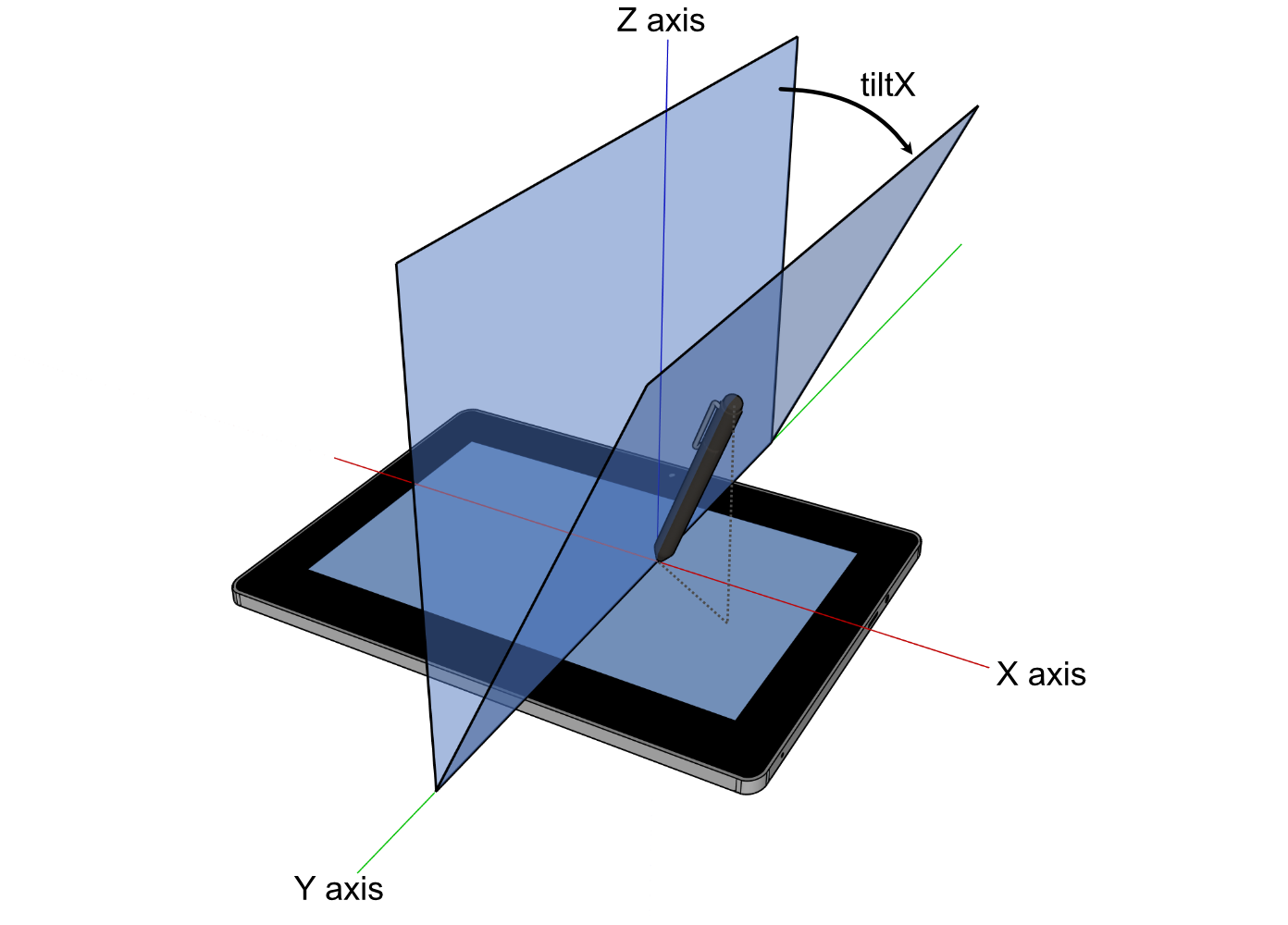
*
* <sub>
* For image attribution, see the
* <a href="https://github.com/rust-windowing/winit/blob/master/winit/docs/ATTRIBUTION.md">
* ATTRIBUTION.md
* </a>
* file.
* </sub>
*/
int8_t x;
/**
* The plane angle in degrees between the surface X-Z plane and the plane containing the tool
* and the surface X axis. Positive values are towards the user. In the range of -90 to
* 90. 0 means the tool is perpendicular to the surface and is the default.
*
* 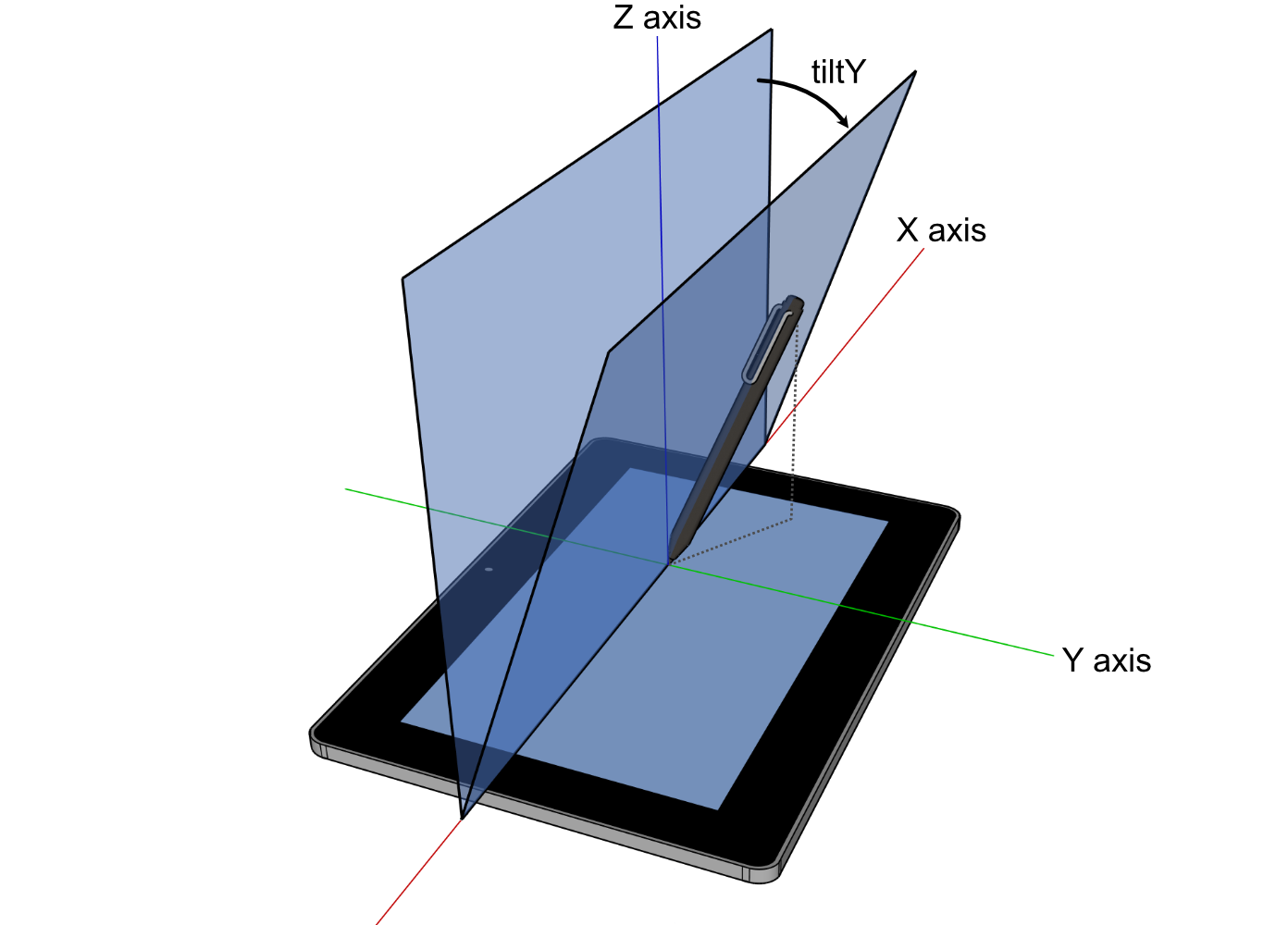
*
* <sub>
* For image attribution, see the
* <a href="https://github.com/rust-windowing/winit/blob/master/winit/docs/ATTRIBUTION.md">
* ATTRIBUTION.md
* </a>
* file.
* </sub>
*/
int8_t y;
} TabletToolTilt;
typedef struct COption_TabletToolTilt {
const struct TabletToolTilt *_0;
} COption_TabletToolTilt;
/**
* The angular position in radians of a tool.
*/
typedef struct TabletToolAngle {
/**
* The altitude angle in radians between the tools perpendicular position to the surface and
* the surface X-Y plane. In the range of 0, parallel to the surface, to π/2, perpendicular to
* the surface. π/2 means the tool is perpendicular to the surface and is the default.
*
* 
*
* <sub>
* For image attribution, see the
* <a href="https://github.com/rust-windowing/winit/blob/master/docs/res/ATTRIBUTION.md">
* ATTRIBUTION.md
* </a>
* file.
* </sub>
*/
double altitude;
/**
* The azimuth angle in radiants representing the rotation between the major axis of the tool
* and the surface X-Y plane. In the range of 0, 3 o'clock, progressively increasing clockwise
* to 2π. 0 means the tool is at 3 o'clock or is perpendicular to the surface (`altitude` of
* π/2) and is the default.
*
* 
*
* <sub>
* For image attribution, see the
* <a href="https://github.com/rust-windowing/winit/blob/master/docs/res/ATTRIBUTION.md">
* ATTRIBUTION.md
* </a>
* file.
* </sub>
*/
double azimuth;
} TabletToolAngle;
typedef struct COption_TabletToolAngle {
const struct TabletToolAngle *_0;
} COption_TabletToolAngle;
typedef struct TabletToolData {
/**
* The force applied to the tool against the surface.
*
* When the force information is not available, [`None`] is returned.
*
* ## Platform-specific
*
* **Web:** Has no mechanism to detect support, so this will always be [`Some`].
*/
struct COption_Force force;
/**
* Represents normalized tangential pressure, also known as barrel pressure. In the range of
* -1 to 1. 0 means no tangential pressure is applied. [`None`] means backend or device has no
* support.
*
* ## Platform-specific
*
* **Web:** Has no mechanism to detect support, so this will always be [`Some`] with a value
* of 0.
*/
struct COption_f32 tangential_force;
/**
* The clockwise rotation in degrees of a tool around its own major axis. E.g. twisting a pen
* around its length. In the range of 0 to 359. [`None`] means backend or device has no
* support.
*
* ## Platform-specific
*
* **Web:** Has no mechanism to detect support, so this will always be [`Some`] with a value
* of 0.
*/
struct COption_u16 twist;
/**
* The plane angle in degrees. [`None`] means backend or device has no support.
*
* ## Platform-specific
*
* **Web:** Has no mechanism to detect support, so this will always be [`Some`] with default
* values.
*/
struct COption_TabletToolTilt tilt;
/**
* The angular position in radians. [`None`] means backend or device has no support.
*
* ## Platform-specific
*
* **Web:** Has no mechanism to detect device support, so this will always be [`Some`] with
* default values unless browser support is lacking.
*/
struct COption_TabletToolAngle angle;
} TabletToolData;
/**
* Represents the pointer type and its data for a pointer event.
*
* **Wayland/X11:** [`Unknown`](Self::Unknown) device types are converted to known variants by the
* system.
*/
enum PointerSource_Tag {
Mouse,
/**
* Represents a touch event.
*
* Every time the user touches the screen, a [`WindowEvent::PointerEntered`] and a
* [`WindowEvent::PointerButton`] with [`ElementState::Pressed`] event with an unique
* identifier for the finger is emitted. When a finger is lifted, a
* [`WindowEvent::PointerButton`] with [`ElementState::Released`] and a
* [`WindowEvent::PointerLeft`] event is generated with the same [`FingerId`].
*
* After a [`WindowEvent::PointerEntered`] event has been emitted, there may be zero or more
* [`WindowEvent::PointerMoved`] events when the finger is moved or the touch pressure
* changes.
*
* A [`WindowEvent::PointerLeft`] without a [`WindowEvent::PointerButton`] with
* [`ElementState::Released`] event is emitted when the system has canceled tracking this
* touch, such as when the window loses focus, or on mobile devices if the user moves the
* device against their face.
*
* The [`FingerId`] may be reused by the system after a [`WindowEvent::PointerLeft`] event.
* The user should assume that a new [`WindowEvent::PointerEntered`] event received with the
* same ID has nothing to do with the old finger and is a new finger.
*
* ## Platform-specific
*
* **macOS:** Unsupported.
*/
Touch,
TabletTool,
Unknown,
};
typedef uint8_t PointerSource_Tag;
typedef struct Touch_Body {
PointerSource_Tag tag;
FingerId finger_id;
/**
* Describes how hard the screen was pressed. May be [`None`] if the hardware does not
* support pressure sensitivity.
*
* ## Platform-specific
*
* - **MacOS / Orbital / Wayland / X11:** Always emits [`None`].
* - **Android:** Will never be [`None`]. If the device doesn't support pressure
* sensitivity, force will either be 0.0 or 1.0. Also see the
* [android documentation](https://developer.android.com/reference/android/view/MotionEvent#AXIS_PRESSURE).
* - **Web:** Will never be [`None`]. If the device doesn't support pressure sensitivity,
* force will be 0.5 when a button is pressed or 0.0 otherwise.
*/
struct COption_Force force;
} Touch_Body;
typedef struct TabletTool_Body {
PointerSource_Tag tag;
/**
* Describes as which tool kind the interaction happened.
*/
TabletToolKind kind;
/**
* Describes how the tool was held and used.
*/
struct TabletToolData data;
} TabletTool_Body;
typedef union PointerSource {
PointerSource_Tag tag;
Touch_Body touch;
TabletTool_Body tablet_tool;
} PointerSource;
/**
* Represents the kind type of a pointer event.
*
* ## Platform-specific
*
* **Wayland/X11:** [`Unknown`](Self::Unknown) device types are converted to known variants by the
* system.
*/
enum PointerKind_Tag {
Mouse,
/**
* See [`PointerSource::Touch`] for more details.
*
* ## Platform-specific
*
* **macOS:** Unsupported.
*/
Touch,
TabletTool,
Unknown,
};
typedef uint8_t PointerKind_Tag;
typedef union PointerKind {
PointerKind_Tag tag;
struct {
PointerKind_Tag touch_tag;
FingerId touch;
};
struct {
PointerKind_Tag tablet_tool_tag;
TabletToolKind tablet_tool;
};
} PointerKind;
/**
* Describes a difference in the mouse scroll wheel state.
*/
enum MouseScrollDelta_Tag {
/**
* Amount in lines or rows to scroll in the horizontal
* and vertical directions.
*
* Positive values indicate that the content that is being scrolled should move
* right and down (revealing more content left and up).
*/
LineDelta,
/**
* Amount in pixels to scroll in the horizontal and
* vertical direction.
*
* Scroll events are expressed as a `PixelDelta` if
* supported by the device (eg. a touchpad) and
* platform.
*
* Positive values indicate that the content being scrolled should
* move right/down.
*
* For a 'natural scrolling' touch pad (that acts like a touch screen)
* this means moving your fingers right and down should give positive values,
* and move the content right and down (to reveal more things left and up).
*/
PixelDelta,
};
typedef uint8_t MouseScrollDelta_Tag;
typedef struct LineDelta_Body {
MouseScrollDelta_Tag tag;
float _0;
float _1;
} LineDelta_Body;
typedef union MouseScrollDelta {
MouseScrollDelta_Tag tag;
LineDelta_Body line_delta;
struct {
MouseScrollDelta_Tag pixel_delta_tag;
struct PhysicalPosition_f64 pixel_delta;
};
} MouseScrollDelta;
/**
* Describes a button of a tool, e.g. a pen.
*/
enum TabletToolButton_Tag {
Contact,
Barrel,
Other,
};
typedef uint8_t TabletToolButton_Tag;
typedef union TabletToolButton {
TabletToolButton_Tag tag;
struct {
TabletToolButton_Tag other_tag;
uint16_t other;
};
} TabletToolButton;
/**
* Represents the pointer type of a [`WindowEvent::PointerButton`].
*
* **Wayland/X11:** [`Unknown`](Self::Unknown) device types are converted to known variants by the
* system.
*/
enum ButtonSource_Tag {
Mouse,
/**
* See [`PointerSource::Touch`] for more details.
*
* ## Platform-specific
*
* **macOS:** Unsupported.
*/
Touch,
TabletTool,
/**
* A pointer button of unknown source.
*
* Codes are undefined and may not be reproducible across platforms or winit versions.
*/
Unknown,
};
typedef uint8_t ButtonSource_Tag;
typedef struct Touch_Body {
ButtonSource_Tag tag;
FingerId finger_id;
struct COption_Force force;
} Touch_Body;
typedef struct TabletTool_Body {
ButtonSource_Tag tag;
TabletToolKind kind;
union TabletToolButton button;
struct TabletToolData data;
} TabletTool_Body;
typedef union ButtonSource {
ButtonSource_Tag tag;
struct {
ButtonSource_Tag mouse_tag;
MouseButton mouse;
};
Touch_Body touch;
TabletTool_Body tablet_tool;
struct {
ButtonSource_Tag unknown_tag;
uint16_t unknown;
};
} ButtonSource;
/**
* A position represented in physical pixels.
*/
typedef struct PhysicalPosition_f32 {
float x;
float y;
} PhysicalPosition_f32;
/**
* Handle to synchronously change the size of the window from the [`WindowEvent`].
*/
typedef struct SurfaceSizeWriter {
void *new_surface_size;
} SurfaceSizeWriter;
enum WindowEvent_Tag {
/**
* The activation token was delivered back and now could be used.
*/
ActivationTokenDone,
/**
* The size of the window's surface has changed.
*
* Contains the new dimensions of the surface (can also be retrieved with
* [`Window::surface_size`]).
*
* This event will not necessarily be emitted upon window creation, query
* [`Window::surface_size`] if you need to determine the surface's initial size.
*
* [`Window::surface_size`]: crate::window::Window::surface_size
*/
SurfaceResized,
/**
* The position of the window has changed.
*
* Contains the window's new position in desktop coordinates (can also be retrieved with
* [`Window::outer_position`]).
*
* ## Platform-specific
*
* - **iOS / Android / Web / Wayland:** Unsupported.
*/
Moved,
/**
* The window has been requested to close.
*/
CloseRequested,
/**
* The window has been destroyed.
*/
Destroyed,
/**
* A file drag operation has entered the window.
*/
DragEntered,
/**
* A file drag operation has moved over the window.
*/
DragMoved,
/**
* The file drag operation has dropped file(s) on the window.
*/
DragDropped,
/**
* The file drag operation has been cancelled or left the window.
*/
DragLeft,
/**
* The window gained or lost focus.
*
* The parameter is true if the window has gained focus, and false if it has lost focus.
*
* Windows are unfocused upon creation, but will usually be focused by the system soon
* afterwards.
*/
Focused,
/**
* An event from the keyboard has been received.
*
* ## Platform-specific
* - **Windows:** The shift key overrides NumLock. In other words, while shift is held down,
* numpad keys act as if NumLock wasn't active. When this is used, the OS sends fake key
* events which are not marked as `is_synthetic`.
* - **iOS:** Unsupported.
*/
KeyboardInput,
/**
* The keyboard modifiers have changed.
*/
ModifiersChanged,
/**
* An event from an input method.
*
* **Note:** You have to explicitly enable this event using [`Window::set_ime_allowed`].
*
* ## Platform-specific
*
* - **iOS / Android / Web / Orbital:** Unsupported.
*/
Ime,
/**
* The pointer has moved on the window.
*/
PointerMoved,
/**
* The pointer has entered the window.
*/
PointerEntered,
/**
* The pointer has left the window.
*/
PointerLeft,
/**
* A mouse wheel movement or touchpad scroll occurred.
*/
MouseWheel,
/**
* An mouse button press has been received.
*/
PointerButton,
/**
* Two-finger pinch gesture, often used for magnification.
*
* ## Platform-specific
*
* - Only available on **macOS**, **iOS**, and **Wayland**.
* - On iOS, not recognized by default. It must be enabled when needed.
*/
PinchGesture,
/**
* N-finger pan gesture
*
* ## Platform-specific
*
* - Only available on **iOS** and **Wayland**.
* - On iOS, not recognized by default. It must be enabled when needed.
*/
PanGesture,
/**
* Double tap gesture.
*
* On a Mac, smart magnification is triggered by a double tap with two fingers
* on the trackpad and is commonly used to zoom on a certain object
* (e.g. a paragraph of a PDF) or (sort of like a toggle) to reset any zoom.
* The gesture is also supported in Safari, Pages, etc.
*
* The event is general enough that its generating gesture is allowed to vary
* across platforms. It could also be generated by another device.
*
* Unfortunately, neither [Windows](https://support.microsoft.com/en-us/windows/touch-gestures-for-windows-a9d28305-4818-a5df-4e2b-e5590f850741)
* nor [Wayland](https://wayland.freedesktop.org/libinput/doc/latest/gestures.html)
* support this gesture or any other gesture with the same effect.
*
* ## Platform-specific
*
* - Only available on **macOS 10.8** and later, and **iOS**.
* - On iOS, not recognized by default. It must be enabled when needed.
*/
DoubleTapGesture,
/**
* Two-finger rotation gesture.
*
* Positive delta values indicate rotation counterclockwise and
* negative delta values indicate rotation clockwise.
*
* ## Platform-specific
*
* - Only available on **macOS**, **iOS**, and **Wayland**.
* - On iOS, not recognized by default. It must be enabled when needed.
*/
RotationGesture,
/**
* Touchpad pressure event.
*
* ## Platform-specific
*
* - **macOS**: Only supported on Apple forcetouch-capable macbooks.
* - **Android / iOS / Wayland / X11 / Windows / Orbital / Web:** Unsupported.
*/
TouchpadPressure,
/**
* The window's scale factor has changed.
*
* The following user actions can cause DPI changes:
*
* * Changing the display's resolution.
* * Changing the display's scale factor (e.g. in Control Panel on Windows).
* * Moving the window to a display with a different scale factor.
*
* To update the window size, use the provided [`SurfaceSizeWriter`] handle. By default, the
* window is resized to the value suggested by the OS, but it can be changed to any value.
*
* This event will not necessarily be emitted upon window creation, query
* [`Window::scale_factor`] if you need to determine the window's initial scale factor.
*
* For more information about DPI in general, see the [`dpi`] crate.
*
* [`Window::scale_factor`]: crate::window::Window::scale_factor
*/
ScaleFactorChanged,
/**
* The system window theme has changed.
*
* Applications might wish to react to this to change the theme of the content of the window
* when the system changes the window theme.
*
* This only reports a change if the window theme was not overridden by [`Window::set_theme`].
*
* ## Platform-specific
*
* - **iOS / Android / X11 / Wayland / Orbital:** Unsupported.
*/
ThemeChanged,
/**
* The window has been occluded (completely hidden from view).
*
* This is different to window visibility as it depends on whether the window is closed,
* minimised, set invisible, or fully occluded by another window.
*
* ## Platform-specific
*
* ### iOS
*
* On iOS, the `Occluded(false)` event is emitted in response to an
* [`applicationWillEnterForeground`] callback which means the application should start
* preparing its data. The `Occluded(true)` event is emitted in response to an
* [`applicationDidEnterBackground`] callback which means the application should free
* resources (according to the [iOS application lifecycle]).
*
* [`applicationWillEnterForeground`]: https://developer.apple.com/documentation/uikit/uiapplicationdelegate/1623076-applicationwillenterforeground
* [`applicationDidEnterBackground`]: https://developer.apple.com/documentation/uikit/uiapplicationdelegate/1622997-applicationdidenterbackground
* [iOS application lifecycle]: https://developer.apple.com/documentation/uikit/app_and_environment/managing_your_app_s_life_cycle
*
* ### Others
*
* - **Web:** Doesn't take into account CSS [`border`], [`padding`], or [`transform`].
* - **Android / Wayland / Windows / Orbital:** Unsupported.
*
* [`border`]: https://developer.mozilla.org/en-US/docs/Web/CSS/border
* [`padding`]: https://developer.mozilla.org/en-US/docs/Web/CSS/padding
* [`transform`]: https://developer.mozilla.org/en-US/docs/Web/CSS/transform
*/
Occluded,
/**
* Emitted when a window should be redrawn.
*
* This gets triggered in a few scenarios:
* - The OS has performed an operation that's invalidated the window's contents (such as
* resizing the window, or changing [the safe area]).
* - The application has explicitly requested a redraw via [`Window::request_redraw`].
*
* Winit will aggregate duplicate redraw requests into a single event, to
* help avoid duplicating rendering work.
*
* [the safe area]: crate::window::Window::safe_area
*/
RedrawRequested,
};
typedef uint16_t WindowEvent_Tag;
typedef struct ActivationTokenDone_Body {
WindowEvent_Tag tag;
AsyncRequestSerial serial;
ActivationToken token;
} ActivationTokenDone_Body;
typedef struct DragEntered_Body {
WindowEvent_Tag tag;
/**
* List of paths that are being dragged onto the window.
*/
struct CVec_CPathBuf paths;
/**
* (x,y) coordinates in pixels relative to the top-left corner of the window. May be
* negative on some platforms if something is dragged over a window's decorations (title
* bar, frame, etc).
*/
struct PhysicalPosition_f64 position;
} DragEntered_Body;
typedef struct DragMoved_Body {
WindowEvent_Tag tag;
/**
* (x,y) coordinates in pixels relative to the top-left corner of the window. May be
* negative on some platforms if something is dragged over a window's decorations (title
* bar, frame, etc).
*/
struct PhysicalPosition_f64 position;
} DragMoved_Body;
typedef struct DragDropped_Body {
WindowEvent_Tag tag;
/**
* List of paths that are being dragged onto the window.
*/
struct CVec_CPathBuf paths;
/**
* (x,y) coordinates in pixels relative to the top-left corner of the window. May be
* negative on some platforms if something is dragged over a window's decorations (title
* bar, frame, etc).
*/
struct PhysicalPosition_f64 position;
} DragDropped_Body;
typedef struct DragLeft_Body {
WindowEvent_Tag tag;
/**
* (x,y) coordinates in pixels relative to the top-left corner of the window. May be
* negative on some platforms if something is dragged over a window's decorations (title
* bar, frame, etc).
*
* ## Platform-specific
*
* - **Windows:** Always emits [`None`].
*/
struct COption_PhysicalPosition_f64 position;
} DragLeft_Body;
typedef struct KeyboardInput_Body {
WindowEvent_Tag tag;
struct COption_DeviceId device_id;
struct KeyEvent event;
/**
* If `true`, the event was generated synthetically by winit
* in one of the following circumstances:
*
* * Synthetic key press events are generated for all keys pressed when a window gains
* focus. Likewise, synthetic key release events are generated for all keys pressed when
* a window goes out of focus. ***Currently, this is only functional on X11 and
* Windows***
*
* Otherwise, this value is always `false`.
*/
bool is_synthetic;
} KeyboardInput_Body;
typedef struct PointerMoved_Body {
WindowEvent_Tag tag;
struct COption_DeviceId device_id;
/**
* (x,y) coordinates in pixels relative to the top-left corner of the window. Because the
* range of this data is limited by the display area and it may have been
* transformed by the OS to implement effects such as pointer acceleration, it
* should not be used to implement non-pointer-like interactions such as 3D camera
* control. For that, consider [`DeviceEvent::PointerMotion`].
*
* ## Platform-specific
*
* **Web:** Doesn't take into account CSS [`border`], [`padding`], or [`transform`].
*
* [`border`]: https://developer.mozilla.org/en-US/docs/Web/CSS/border
* [`padding`]: https://developer.mozilla.org/en-US/docs/Web/CSS/padding
* [`transform`]: https://developer.mozilla.org/en-US/docs/Web/CSS/transform
*/
struct PhysicalPosition_f64 position;
/**
* Indicates whether the event is created by a primary pointer.
*
* A pointer is considered primary when it's a mouse, the first finger in a multi-touch
* interaction, or an unknown pointer source.
*/
bool primary;
union PointerSource source;
} PointerMoved_Body;
typedef struct PointerEntered_Body {
WindowEvent_Tag tag;
struct COption_DeviceId device_id;
/**
* The position of the pointer when it entered the window.
*
* ## Platform-specific
*
* - **Orbital: Always emits `(0., 0.)`.
* - **Web:** Doesn't take into account CSS [`border`], [`padding`], or [`transform`].
*
* [`border`]: https://developer.mozilla.org/en-US/docs/Web/CSS/border
* [`padding`]: https://developer.mozilla.org/en-US/docs/Web/CSS/padding
* [`transform`]: https://developer.mozilla.org/en-US/docs/Web/CSS/transform
*/
struct PhysicalPosition_f64 position;
/**
* Indicates whether the event is created by a primary pointer.
*
* A pointer is considered primary when it's a mouse, the first finger in a multi-touch
* interaction, or an unknown pointer source.
*/
bool primary;
union PointerKind kind;
} PointerEntered_Body;
typedef struct PointerLeft_Body {
WindowEvent_Tag tag;
struct COption_DeviceId device_id;
/**
* The position of the pointer when it left the window. The position reported can be
* outside the bounds of the window.
*
* ## Platform-specific
*
* - **Orbital/Windows:** Always emits [`None`].
* - **Web:** Doesn't take into account CSS [`border`], [`padding`], or [`transform`].
*
* [`border`]: https://developer.mozilla.org/en-US/docs/Web/CSS/border
* [`padding`]: https://developer.mozilla.org/en-US/docs/Web/CSS/padding
* [`transform`]: https://developer.mozilla.org/en-US/docs/Web/CSS/transform
*/
struct COption_PhysicalPosition_f64 position;
/**
* Indicates whether the event is created by a primary pointer.
*
* A pointer is considered primary when it's a mouse, the first finger in a multi-touch
* interaction, or an unknown pointer source.
*/
bool primary;
union PointerKind kind;
} PointerLeft_Body;
typedef struct MouseWheel_Body {
WindowEvent_Tag tag;
struct COption_DeviceId device_id;
union MouseScrollDelta delta;
TouchPhase phase;
} MouseWheel_Body;
typedef struct PointerButton_Body {
WindowEvent_Tag tag;
struct COption_DeviceId device_id;
ElementState state;
/**
* The position of the pointer when the button was pressed.
*
* ## Platform-specific
*
* - **Orbital: Always emits `(0., 0.)`.
* - **Web:** Doesn't take into account CSS [`border`], [`padding`], or [`transform`].
*
* [`border`]: https://developer.mozilla.org/en-US/docs/Web/CSS/border
* [`padding`]: https://developer.mozilla.org/en-US/docs/Web/CSS/padding
* [`transform`]: https://developer.mozilla.org/en-US/docs/Web/CSS/transform
*/
struct PhysicalPosition_f64 position;
/**
* Indicates whether the event is created by a primary pointer.
*
* A pointer is considered primary when it's a mouse, the first finger in a multi-touch
* interaction, or an unknown pointer source.
*/
bool primary;
union ButtonSource button;
} PointerButton_Body;
typedef struct PinchGesture_Body {
WindowEvent_Tag tag;
struct COption_DeviceId device_id;
/**
* Positive values indicate magnification (zooming in) and negative
* values indicate shrinking (zooming out).
*
* This value may be NaN.
*/
double delta;
TouchPhase phase;
} PinchGesture_Body;
typedef struct PanGesture_Body {
WindowEvent_Tag tag;
struct COption_DeviceId device_id;
/**
* Change in pixels of pan gesture from last update.
*/
struct PhysicalPosition_f32 delta;
TouchPhase phase;
} PanGesture_Body;
typedef struct DoubleTapGesture_Body {
WindowEvent_Tag tag;
struct COption_DeviceId device_id;
} DoubleTapGesture_Body;
typedef struct RotationGesture_Body {
WindowEvent_Tag tag;
struct COption_DeviceId device_id;
/**
* change in rotation in degrees
*/
float delta;
TouchPhase phase;
} RotationGesture_Body;
typedef struct TouchpadPressure_Body {
WindowEvent_Tag tag;
struct COption_DeviceId device_id;
/**
* Value between 0 and 1 representing how hard the touchpad is being
* pressed.
*/
float pressure;
/**
* Represents the click level.
*/
int64_t stage;
} TouchpadPressure_Body;
typedef struct ScaleFactorChanged_Body {
WindowEvent_Tag tag;
double scale_factor;
/**
* Handle to update surface size during scale changes.
*
* See [`SurfaceSizeWriter`] docs for more details.
*/
struct SurfaceSizeWriter surface_size_writer;
} ScaleFactorChanged_Body;
typedef union WindowEvent {
WindowEvent_Tag tag;
ActivationTokenDone_Body activation_token_done;
struct {
WindowEvent_Tag surface_resized_tag;
struct PhysicalSize_u32 surface_resized;
};
struct {
WindowEvent_Tag moved_tag;
struct PhysicalPosition_i32 moved;
};
DragEntered_Body drag_entered;
DragMoved_Body drag_moved;
DragDropped_Body drag_dropped;
DragLeft_Body drag_left;
struct {
WindowEvent_Tag focused_tag;
bool focused;
};
KeyboardInput_Body keyboard_input;
struct {
WindowEvent_Tag modifiers_changed_tag;
struct Modifiers modifiers_changed;
};
struct {
WindowEvent_Tag ime_tag;
union Ime ime;
};
PointerMoved_Body pointer_moved;
PointerEntered_Body pointer_entered;
PointerLeft_Body pointer_left;
MouseWheel_Body mouse_wheel;
PointerButton_Body pointer_button;
PinchGesture_Body pinch_gesture;
PanGesture_Body pan_gesture;
DoubleTapGesture_Body double_tap_gesture;
RotationGesture_Body rotation_gesture;
TouchpadPressure_Body touchpad_pressure;
ScaleFactorChanged_Body scale_factor_changed;
struct {
WindowEvent_Tag theme_changed_tag;
Theme theme_changed;
};
struct {
WindowEvent_Tag occluded_tag;
bool occluded;
};
} WindowEvent;
void event_loop_drop(EventLoop event_loop);
/**
* Builds a new event loop.
*
* ***For cross-platform compatibility, the [`EventLoop`] must be created on the main thread,
* and only once per application.***
*
* Calling this function will result in display backend initialisation.
*
* ## Panics
*
* Attempting to create the event loop off the main thread will panic. This
* restriction isn't strictly necessary on all platforms, but is imposed to
* eliminate any nasty surprises when porting to platforms that require it.
*/
EventLoop event_loop_new(void);
void run_app(EventLoop event_loop,
struct InitActions (*init)(void),
EventActions (*on_window_event)(WindowId, union WindowEvent));